Find Your Fit (Shopify Plugin) - 2021
Solving the E-Commerce Sizing Crisis
Redesigned a Shopify plugin to make merchant setup effortless, driving a 20 - 30%
increase in shopper conversion rates
My Role
Product Designer
Wireframing, Prototyping, Usability Testing
Team
Me (Product Designer)
1 Product Manager
2 Developers
1 Engineer
Timeline
26 Weeks
Overview
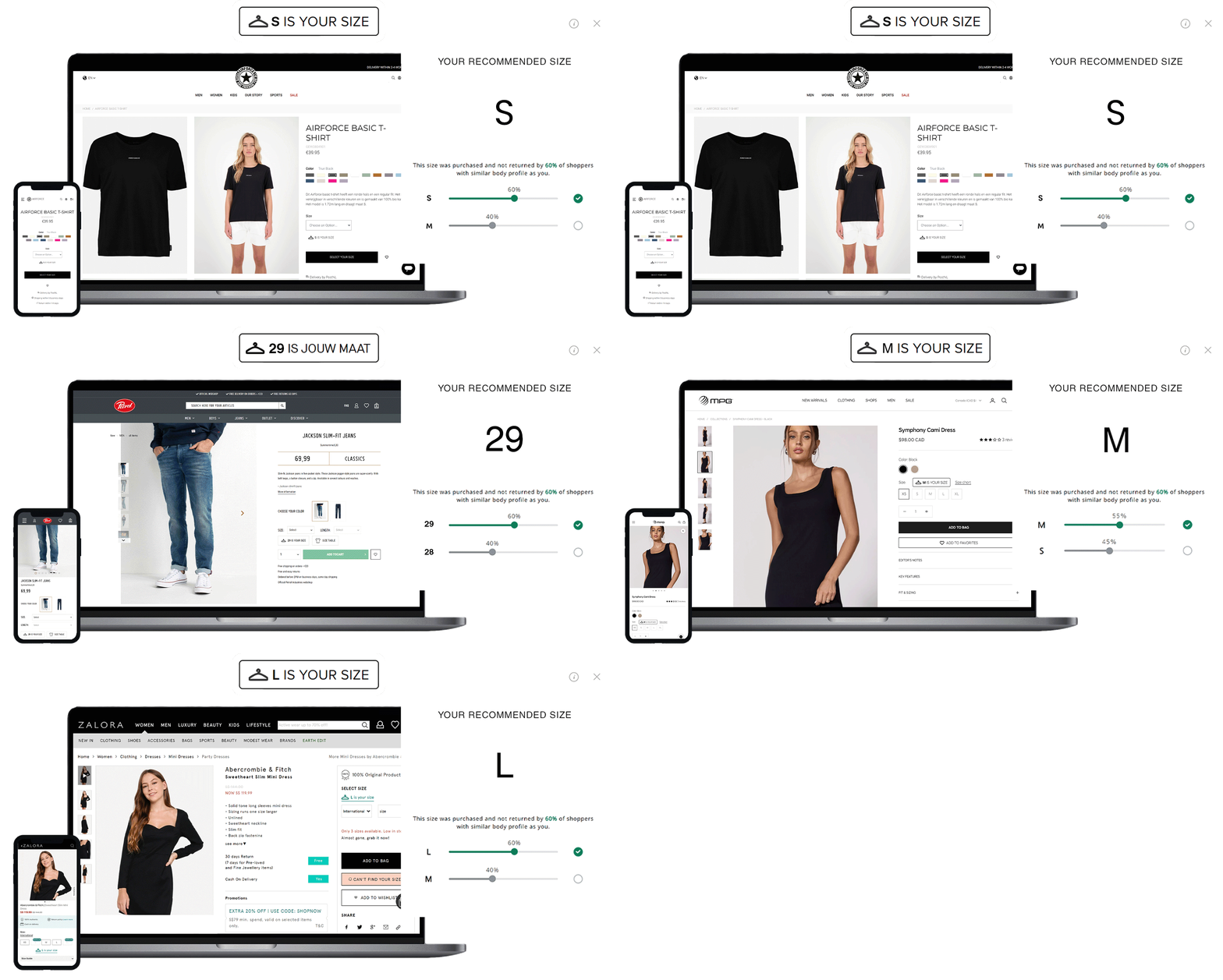
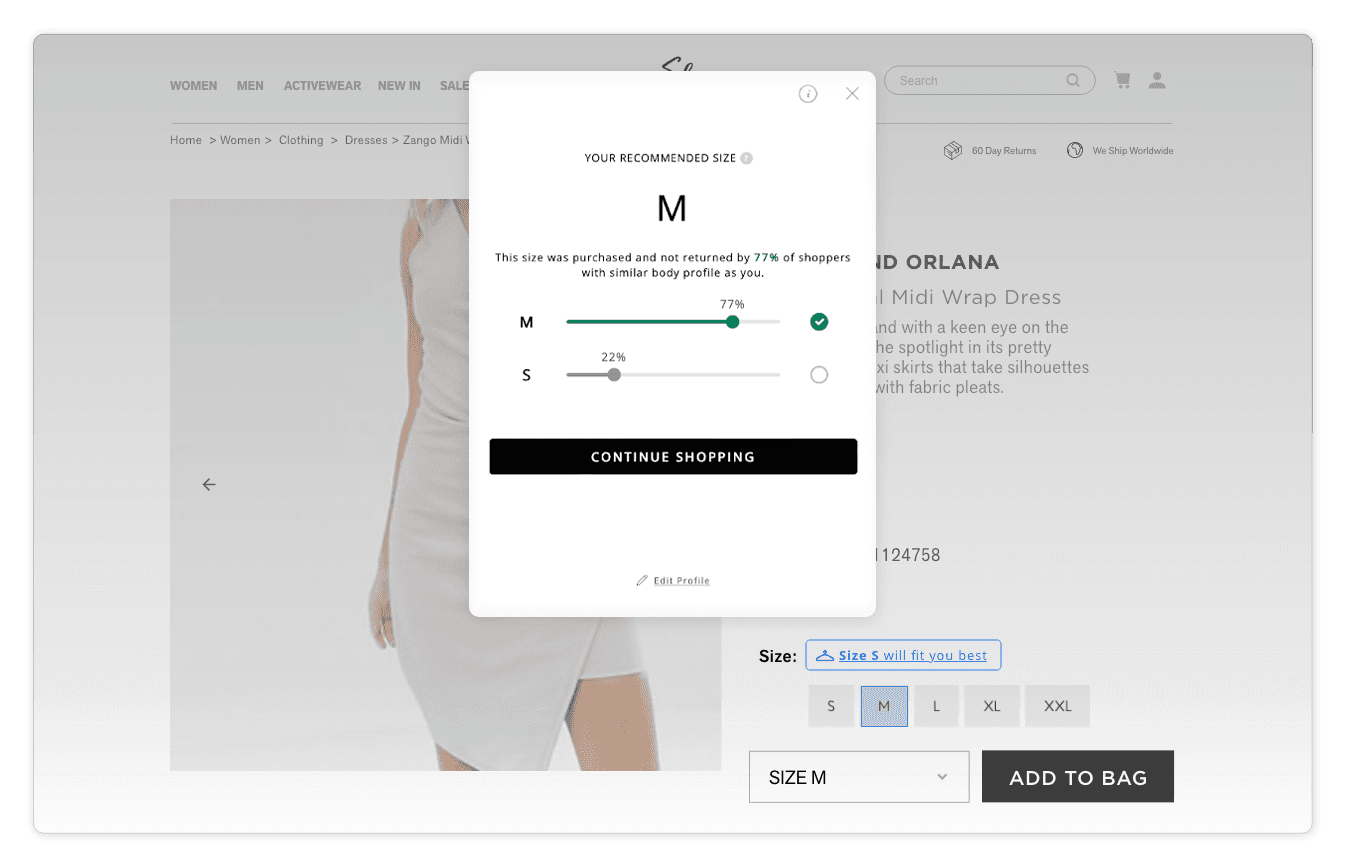
I led the UX/UI redesign of "Find Your Fit," an AI-driven Shopify plugin by Pixibo that helps shoppers confidently find their clothing size.
The original app struggled with adoption because the backend merchant setup was highly technical and confusing. Working closely with PMs and engineers, I redesigned the merchant dashboard from the ground up using the Shopify Polaris Design System.
By simplifying the setup process, we helped major brands like
Mango, Zalora and Pomelo Fashion increase sales coverage by 35%-50% and substantially reduce return rates
+47%
Sales Coverage Rate
+27%
Higher Conversion Rate
-4%
Reduction of Returns
✨
HIGHLIGHTS
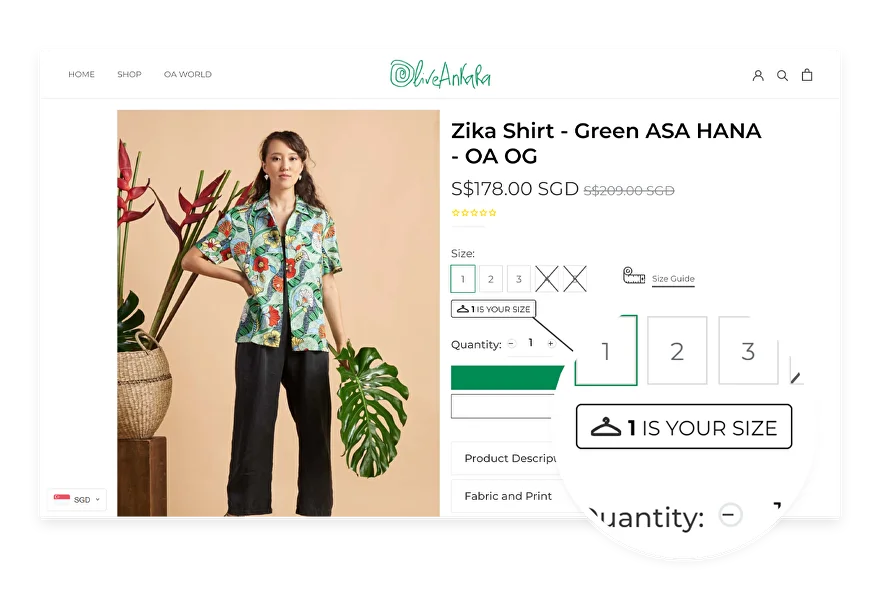
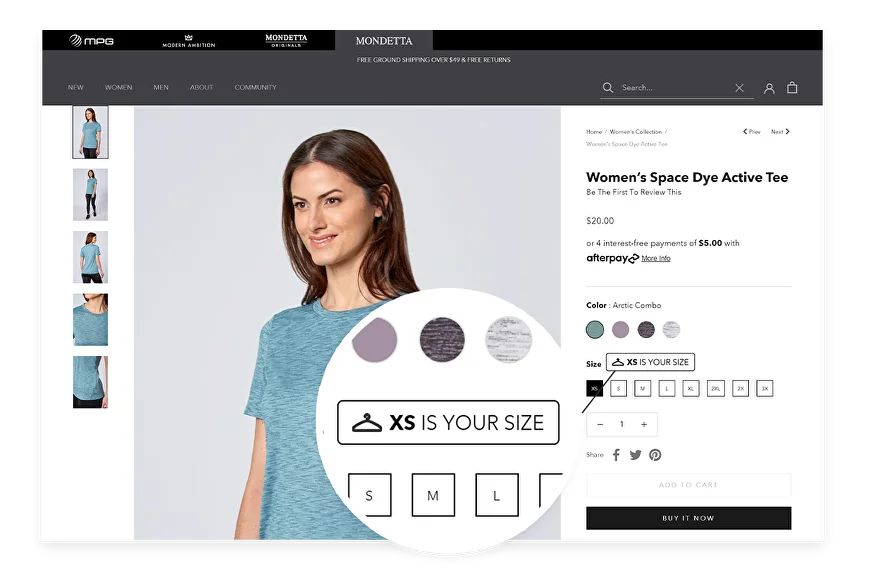
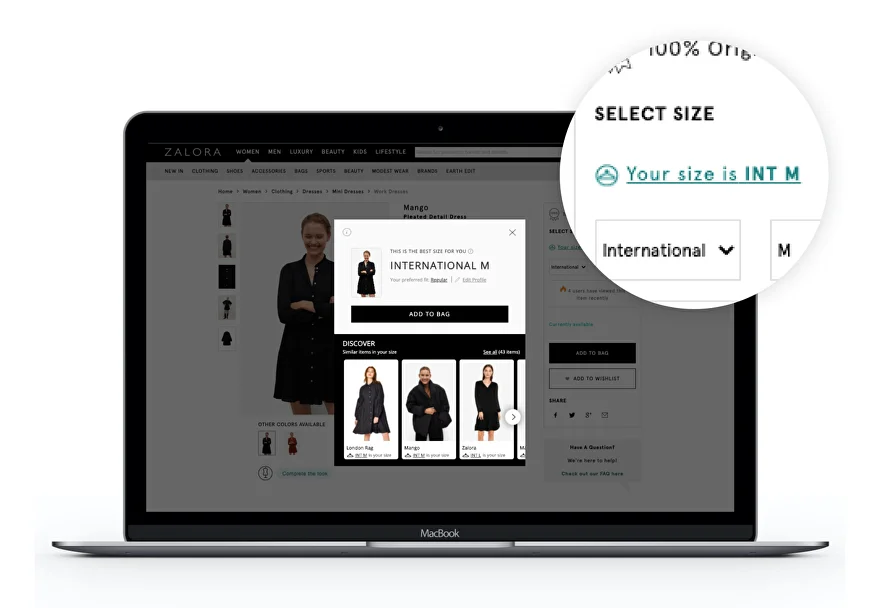
Transforming complex backend configuration into an intuitive, no-code merchant experience
✨
CONTEXT
The guessing game of online fashion
Sizing uncertainty costs retailers billions
Shopping online for clothes should feel exciting, but it often ends in disappointment. Millions of shoppers hesitate at checkout, forced to guess their size.
This uncertainty leads to a frustrating cycle of buying multiple sizes and returning what doesn't fit, costing retailers billions in lost revenue, shipping fees, and customer trust.
✨
PROBLEM
A powerful tool hidden behind a terrible UX
Merchants were overwhelmed, and shoppers were unsupported
Pixibo had a powerful AI size-recommendation engine, but Shopify merchants couldn't figure out how to install or configure it.
Through merchant interviews and analyzing support tickets, I uncovered major usability flaws in the old system:
Poor Information Architecture:
Users didn’t know where to start, and navigation was broken.
Tech-Heavy Jargon:
The widget configurator used developer-focused language, scaring off non-technical boutique owners.
High Error Rates:
Vague labels, missing system feedback, and duplicate "save" buttons caused massive confusion.
The Bottleneck:
Because setup was so hard, merchants required heavy customer support, delaying the launch of the tool for their shoppers.
✨
THE PROBLEM STATEMENT
How might we help shoppers confidently pick the right size while making setup effortless for merchants?
✨
RESEARCH AND DISCOVERY
Empathizing with the Merchant
Designing for enterprise brands,
not just developers
To ground our redesign, I synthesized insights from Heuristic Evaluations, app reviews, and stakeholder interviews to focus on the real-world needs of our actual enterprise clients such as Zalora, Mango, and Sans Faff.
These major brands needed to deploy high-converting storefronts without relying on heavy internal engineering teams; they needed a powerful, plug-and-play SaaS solution.
This shaped our new success criteria:
Reduce Merchant Setup Time:
Ensure a seamless, zero-engineering integration that minimizes technical lift.
Improve Shopper Confidence at Decision Points:
Utilize clear design patterns and AI-assisted tools to guide users and maximize sales coverage.
Lower Overall Return Rates:
Provide accessible, highly polished checkout flows to build trust and reduce post-purchase returns.
✨
DESIGN PROCESS & ITERATION
Translating Complexity into Clarity
Aligning with user mental models and Shopify standards
Through co-design sessions with my PM and developers, we narrowed down the redesign into 4 scalable flows.
To ensure familiarity and trust, I aligned the entire visual hierarchy with the Shopify Polaris Design System.
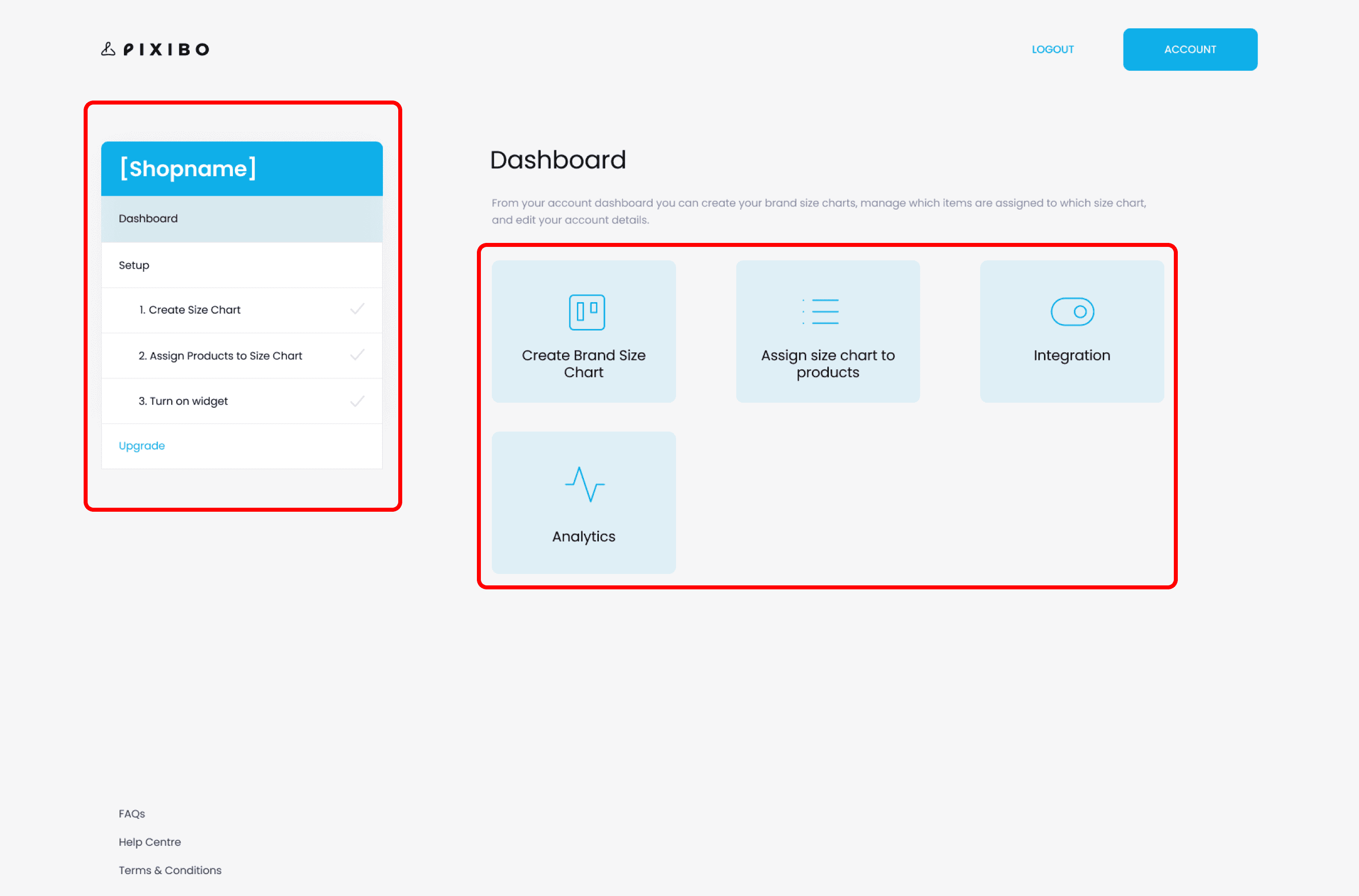
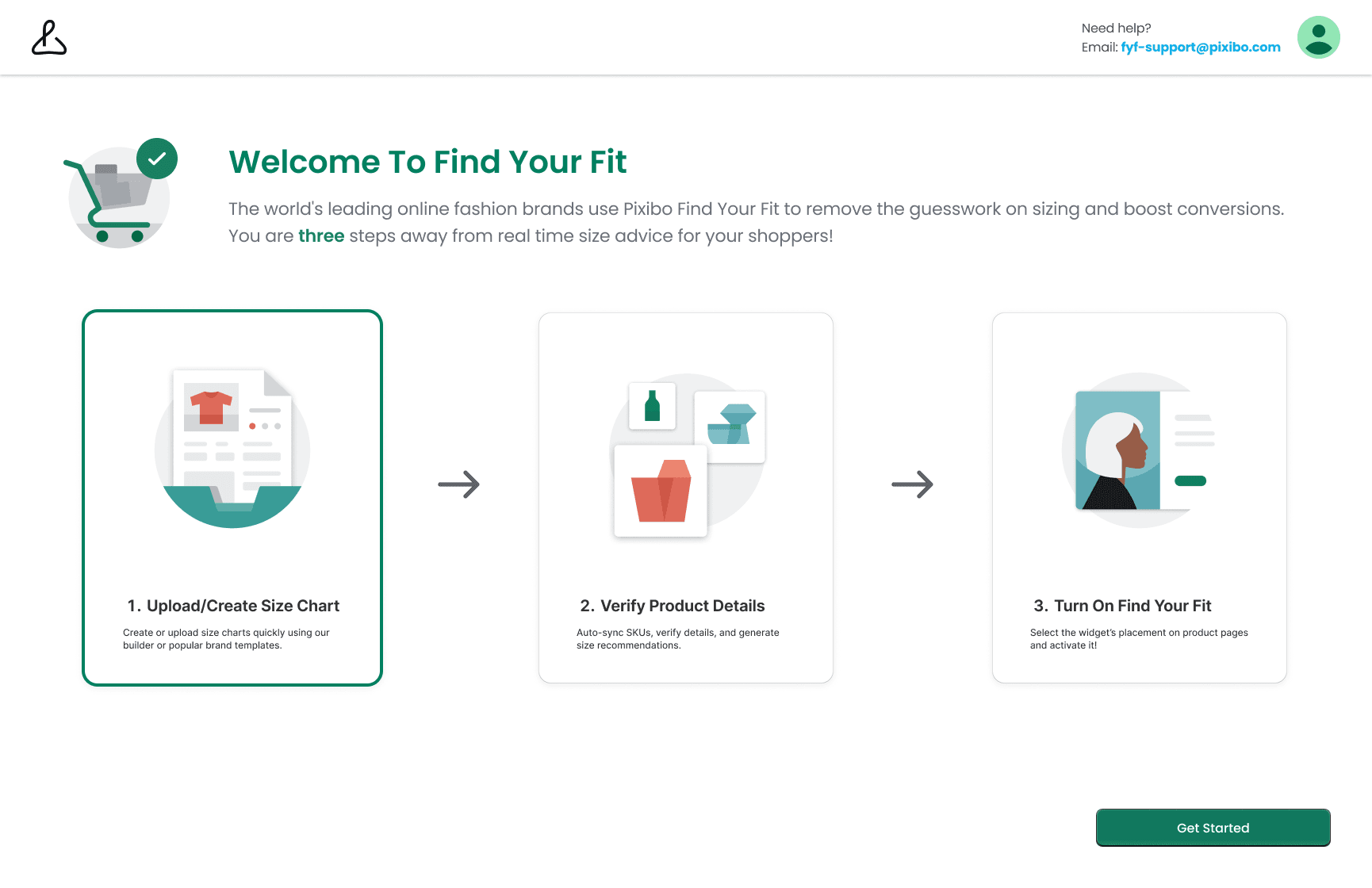
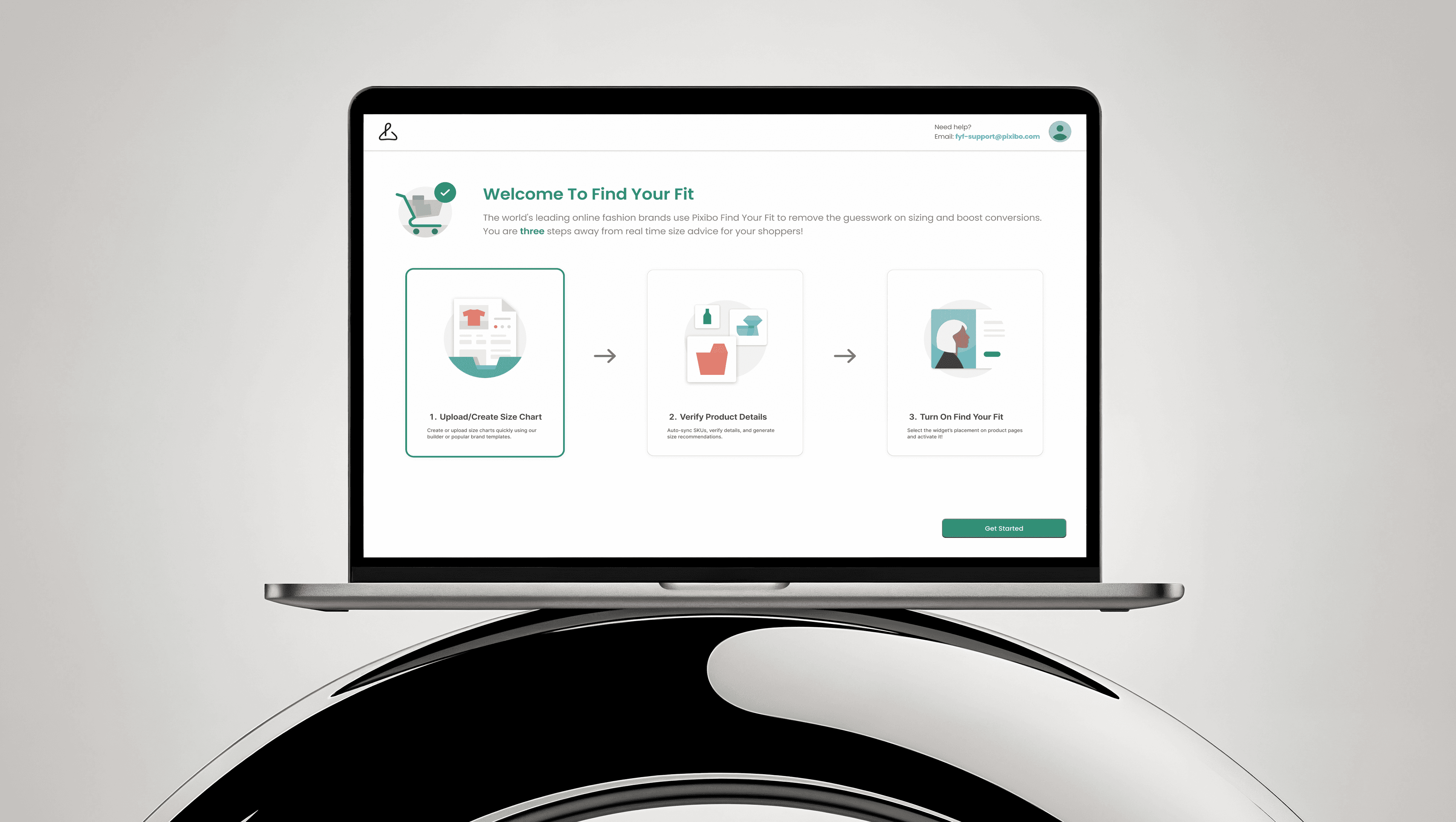
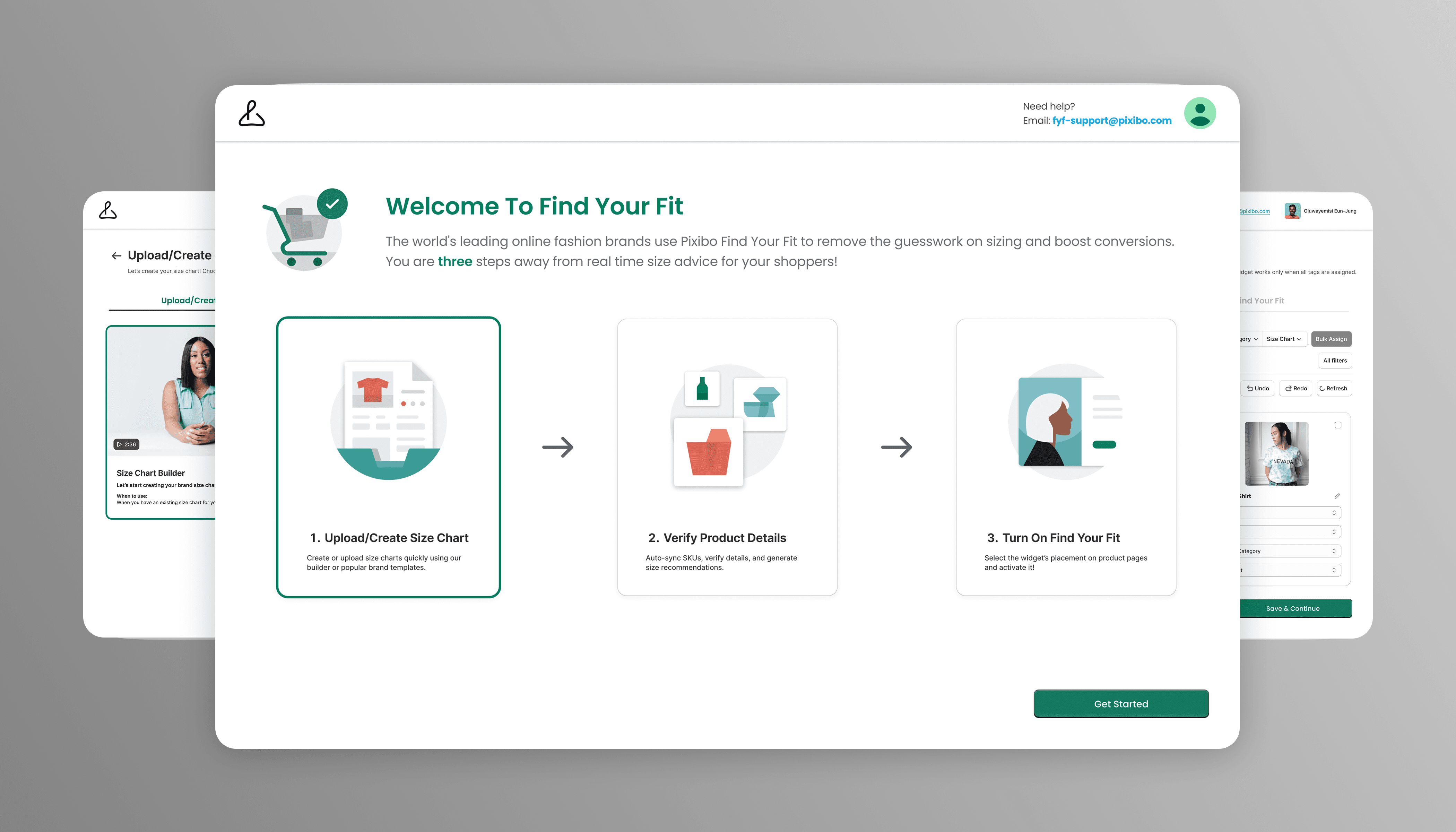
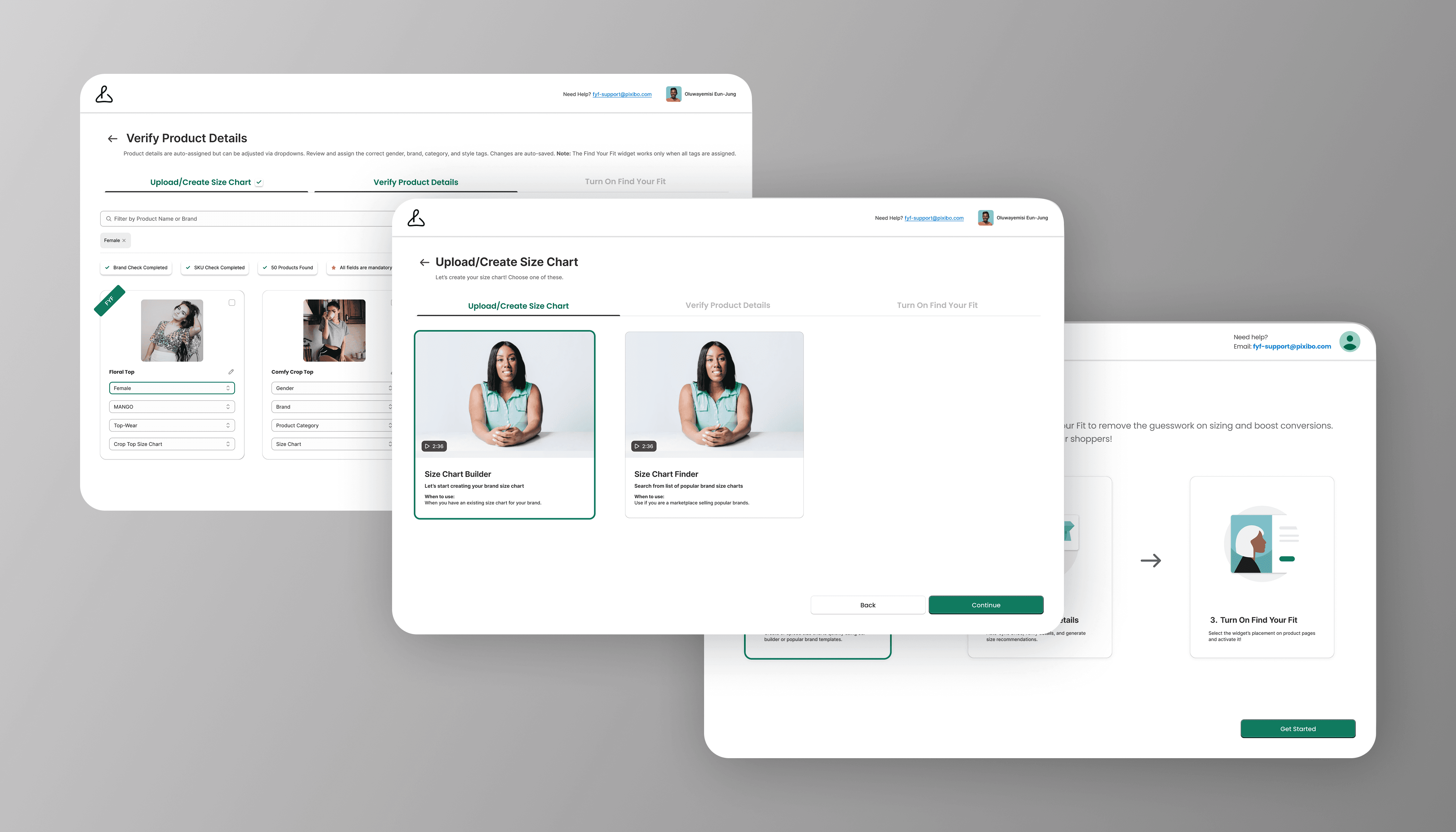
The Dashboard (From Clutter to Clarity)
Before:
A confusing layout with no clear starting point, leaving users unsure if setup was complete.
After:
Introduced a visual 3-step process with progress indicators, descriptive text, and a prominent "Get Started" CTA.
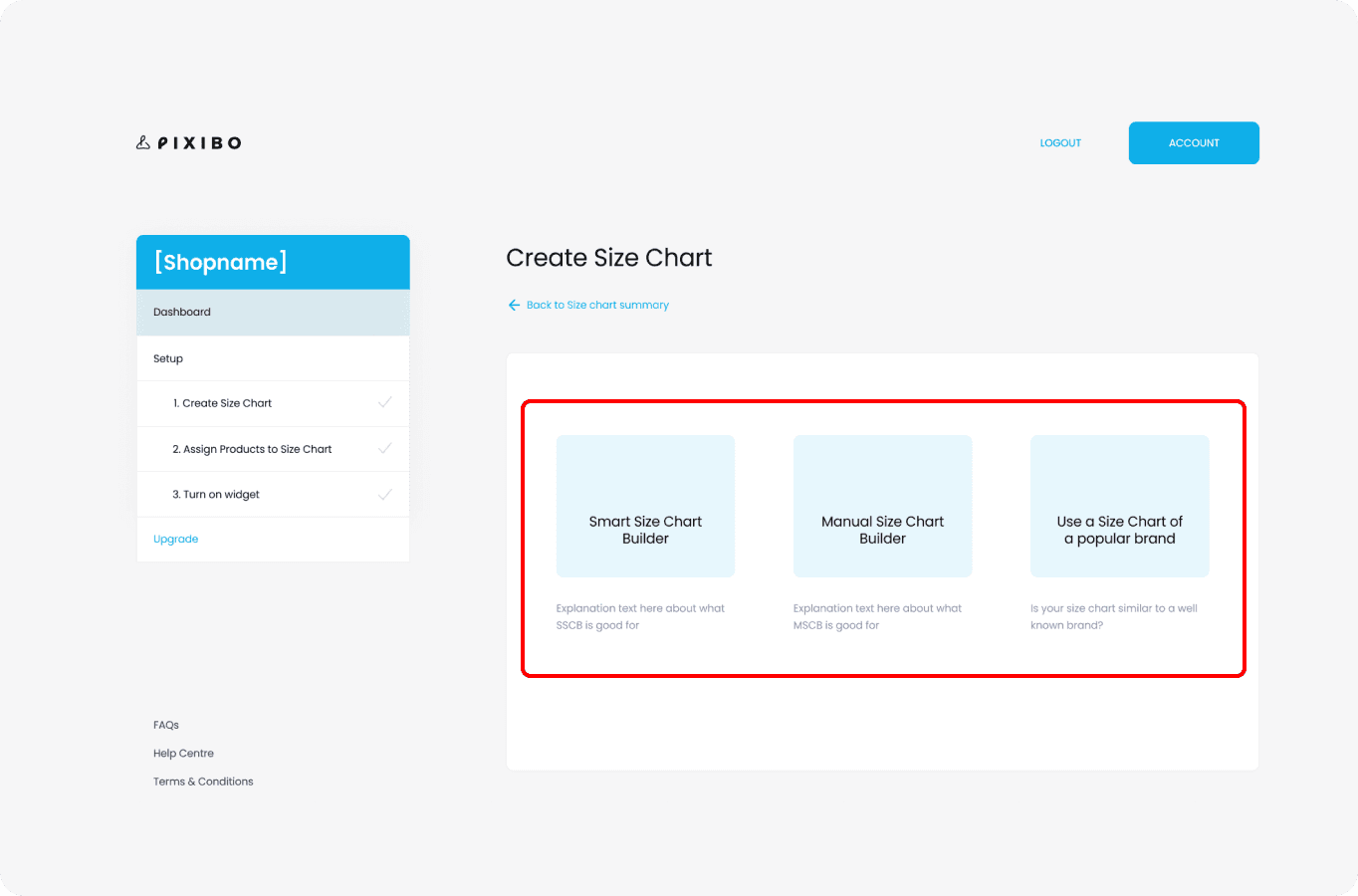
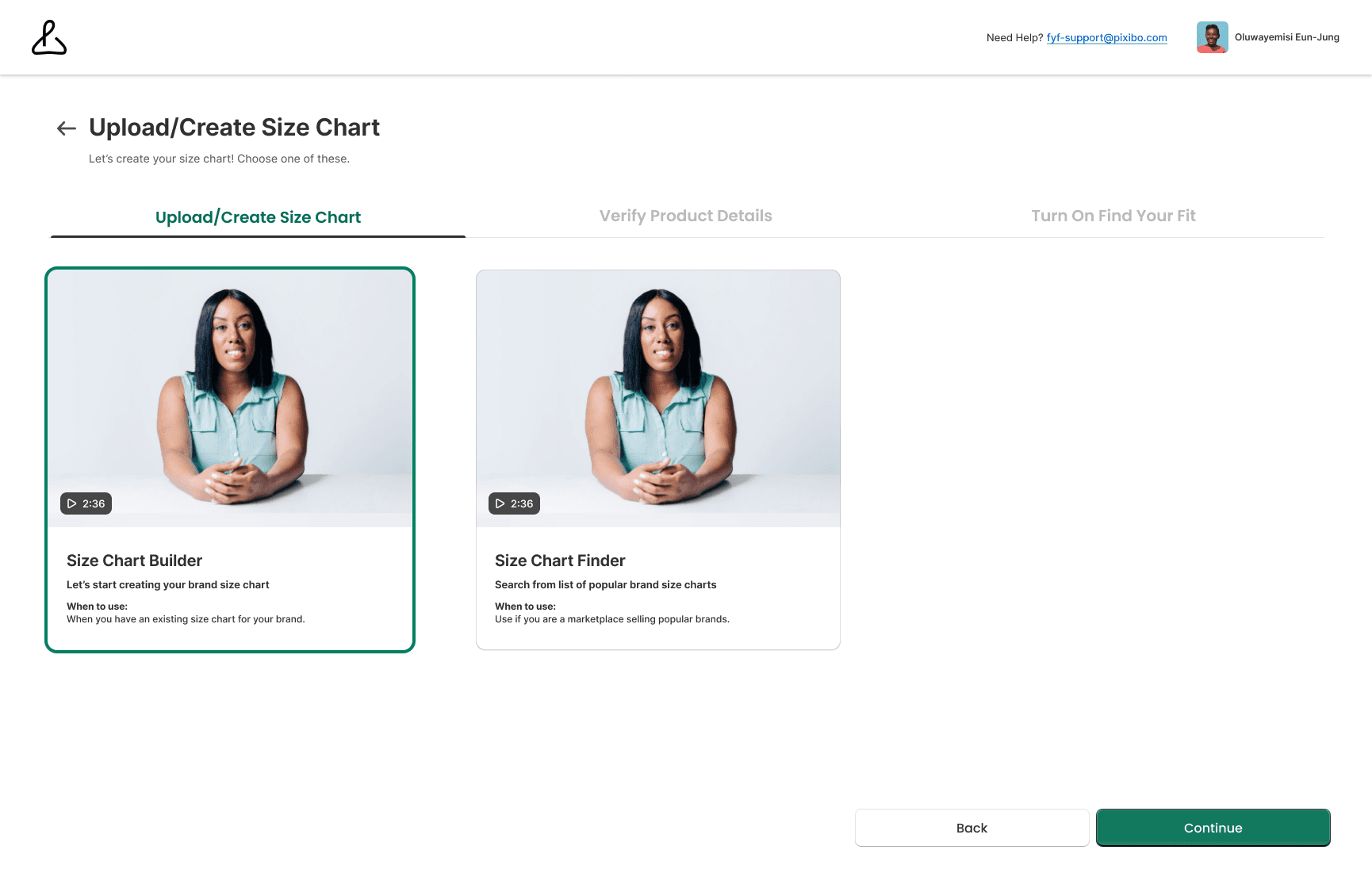
Size Chart Builder (Reducing Decision Paralysis)
Before:
Vague options with no explanations led to high drop-off rates.
After:
Created two distinct options ("Builder" vs "Finder") with 2-minute video tutorials and clear "when to use" guidelines.
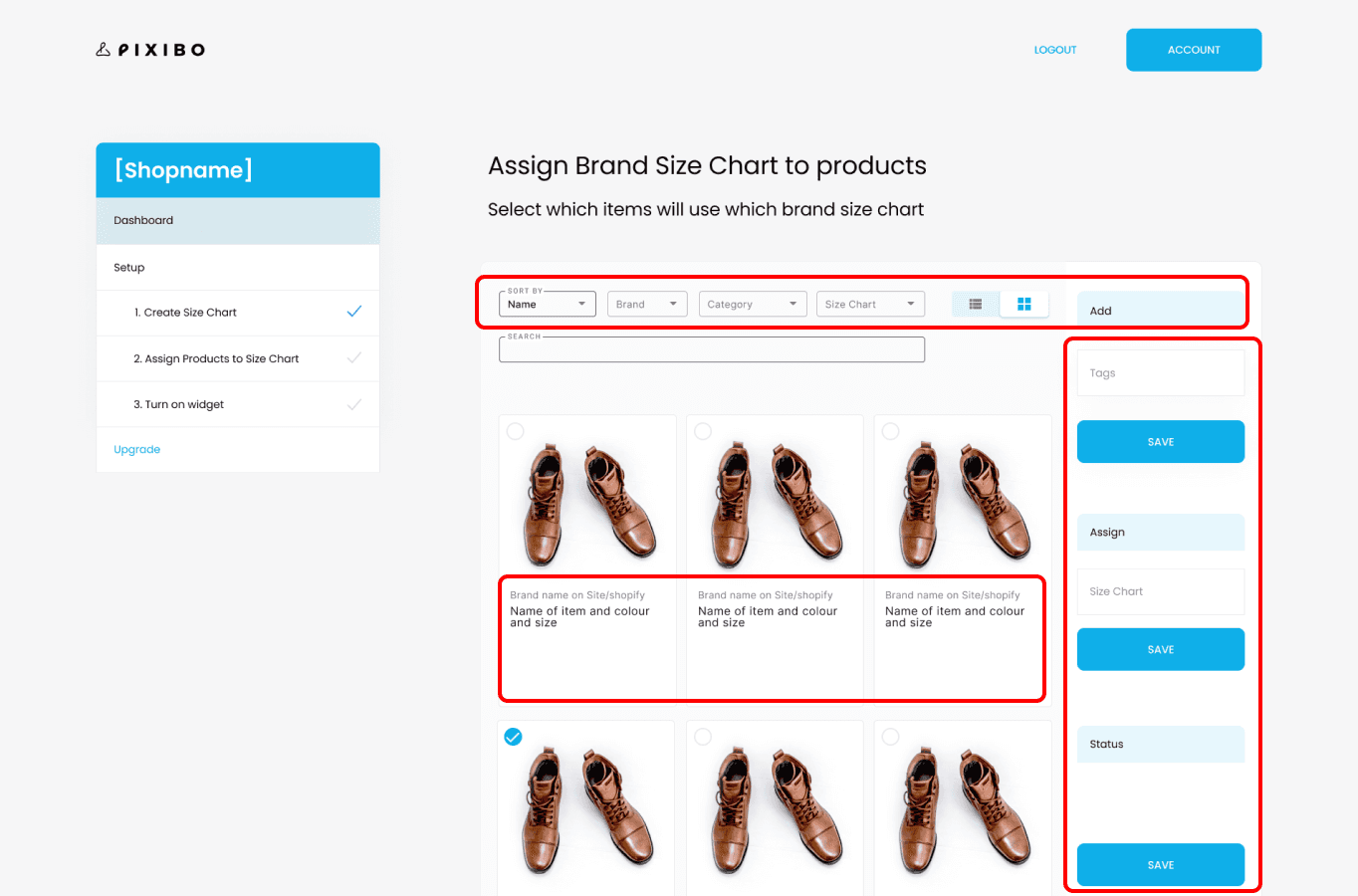
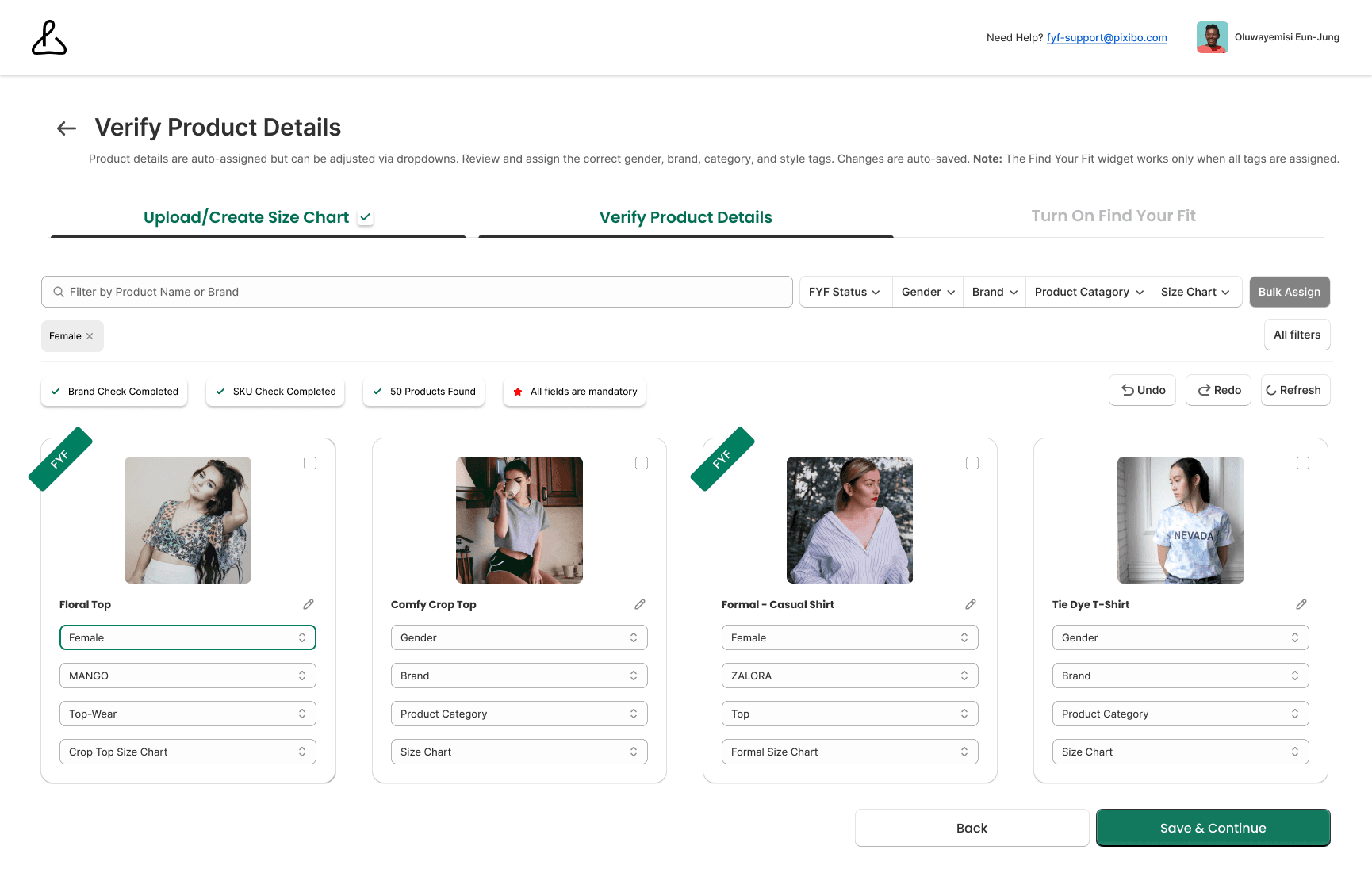
Product Assignment (Preventing Errors)
Before:
A basic interface that lacked bulk actions, forcing merchants to scroll endlessly.
After:
Added bulk assignment functionality, advanced filtering (Gender, Brand, Category), and clear status indicators with Undo/Redo safeguards.
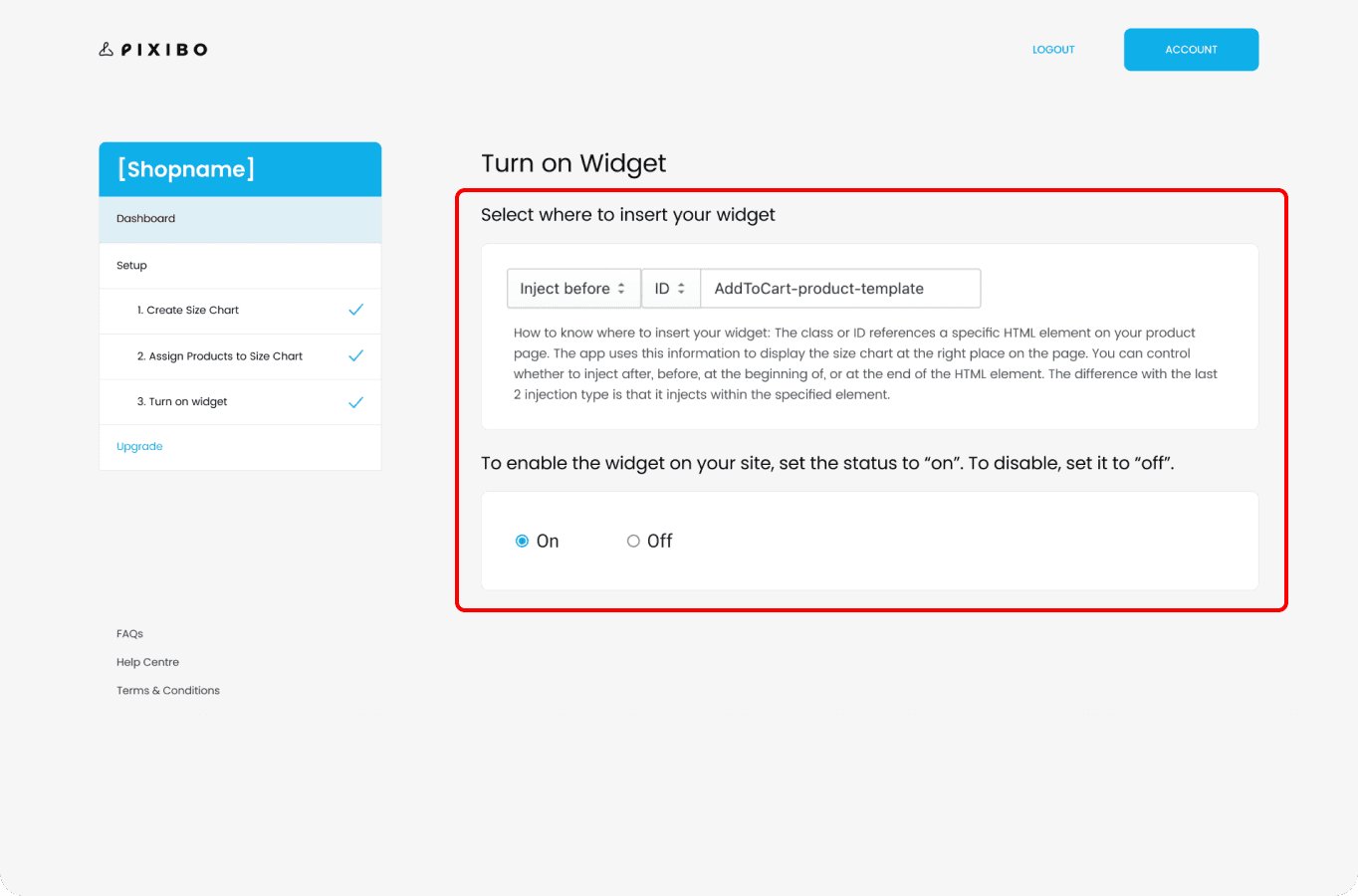
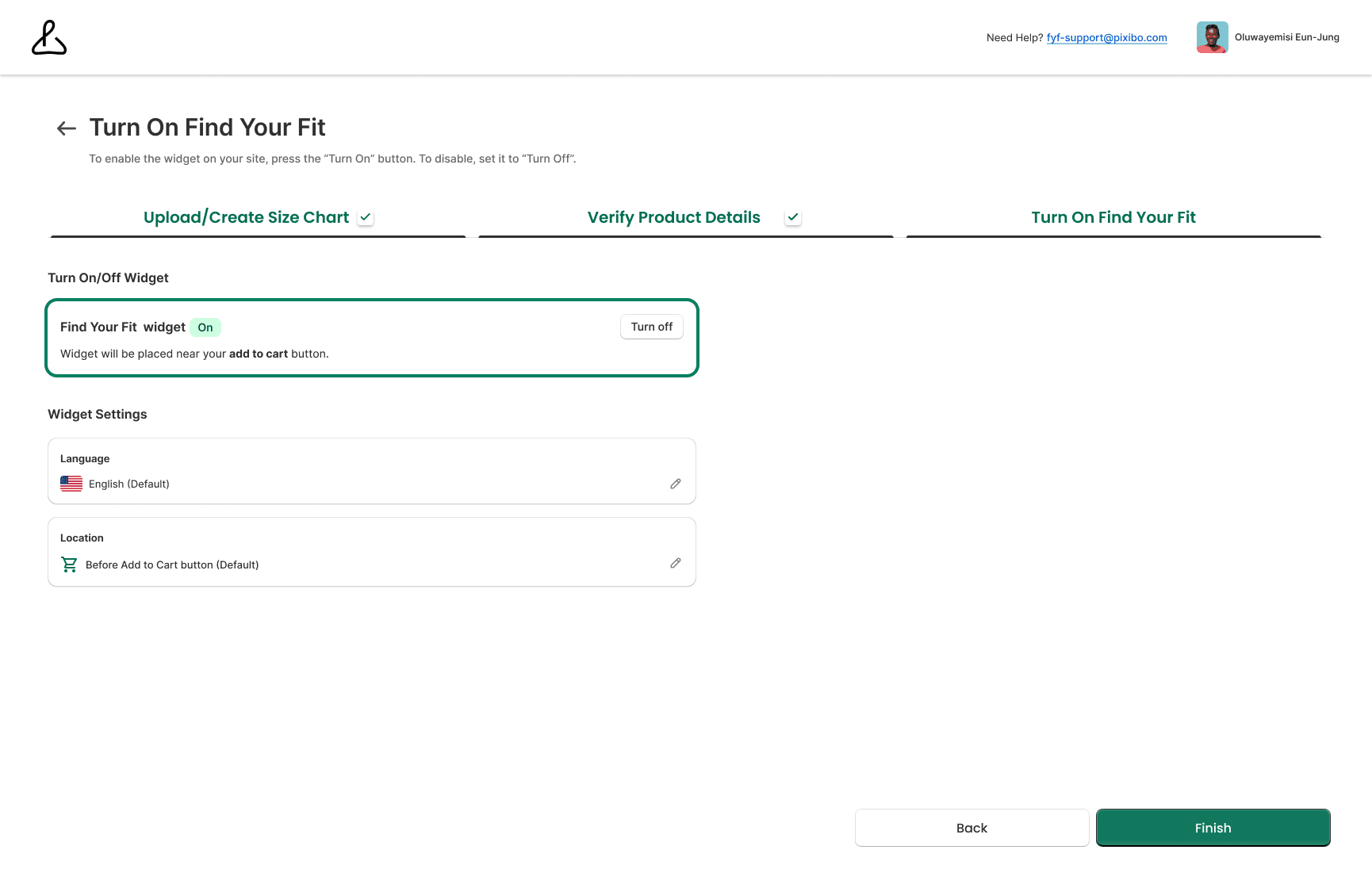
Widget Configurator (No-Code Empowerment)
Before:
Technical language with no visual previews caused immense anxiety.
After:
Replaced jargon with simple On/Off toggles, plain-language placement guidance, and immediate visual feedback.
✨
USABILITY TESTING
Proving the Intuitive Setup
Testing flows to eliminate developer dependency
I ran usability tests with 5 Shopify merchants to evaluate the new Dashboard, Size Chart Builder, and Widget Configurator.
The Result:
All 5 merchants successfully completed the key flows without assistance.
The Iteration:
Based on testing, I refined the edit options, added helper text for "fit preference," and included validation for odd input edge cases.
The Feedback:
"This is way quicker, I don’t need a dev to set this up".
✨
BUSINESS IMPACT
By empathizing with both merchants and shoppers, the redesign delivered massive business value for major brands like Zalora, Pomelo Fashion, and Planet Sports
✨
IMPACT METRICS
Delivering White-Glove Service at Scale
Learning from technical constraints
20% - 30%
Higher Conversion Rates within the first 3 months
3-4%
Lower return rate for Pixibo powered purchases by first year end
35% - 50%
Increase in Sales Coverage for participating brands
Zero Engineering Dependency:
Merchants could now deploy the tool independently, with PomeloFashion's VP of Engineering praising the ability to push the feature with "no dependency on our engineering resources".
✨
LEARNINGS
Designing for Dual Users
Pilot first, data next, insights always
Listen First:
Conducting heuristic reviews and interviews early set the right direction for the architecture.
Design for Trust:
Transparency, progress indicators, and friendly copy built merchant confidence to use the tool.
Collaborate with Devs Early:
Working closely with engineering during the ideation phase ensured our designs were both scalable and technically feasible.
Back to Top
✨
Featured Projects
Where impactful storytelling meets immaculate UX

Hi
Your next UX designer is one email away 😇
I’m currently open for full time roles and collaborations where I can bring user-centered magic to the table ✨
Made with 💖 and 🍵 by Nandini © 2026
Find Your Fit (Shopify Plugin) - 2021
Solving the E-Commerce Sizing Crisis
Redesigned a Shopify plugin to make merchant setup effortless, driving a 20 - 30%
increase in shopper conversion rates
My Role
Product Designer
Wireframing, Prototyping, Usability Testing
Team
Me (Product Designer)
1 Product Manager
2 Developers
1 Engineer
Timeline
26 Weeks
Overview
I led the UX/UI redesign of "Find Your Fit," an AI-driven Shopify plugin by Pixibo that helps shoppers confidently find their clothing size.
The original app struggled with adoption because the backend merchant setup was highly technical and confusing. Working closely with PMs and engineers, I redesigned the merchant dashboard from the ground up using the Shopify Polaris Design System.
By simplifying the setup process, we helped major brands like
Mango, Zalora and Pomelo Fashion increase sales coverage by 35%-50% and substantially reduce return rates
+47%
Sales Coverage Rate
+27%
Higher Conversion Rate
-4%
Reduction of Returns
✨
HIGHLIGHTS
Transforming complex backend configuration into an intuitive, no-code merchant experience
✨
CONTEXT
The guessing game of online fashion
Sizing uncertainty costs retailers billions
Shopping online for clothes should feel exciting, but it often ends in disappointment. Millions of shoppers hesitate at checkout, forced to guess their size.
This uncertainty leads to a frustrating cycle of buying multiple sizes and returning what doesn't fit, costing retailers billions in lost revenue, shipping fees, and customer trust.
✨
PROBLEM
A powerful tool hidden behind a terrible UX
Merchants were overwhelmed, and shoppers were unsupported
Pixibo had a powerful AI size-recommendation engine, but Shopify merchants couldn't figure out how to install or configure it.
Through merchant interviews and analyzing support tickets, I uncovered major usability flaws in the old system:
Poor Information Architecture:
Users didn’t know where to start, and navigation was broken.
Tech-Heavy Jargon:
The widget configurator used developer-focused language, scaring off non-technical boutique owners.
High Error Rates:
Vague labels, missing system feedback, and duplicate "save" buttons caused massive confusion.
The Bottleneck:
Because setup was so hard, merchants required heavy customer support, delaying the launch of the tool for their shoppers.
✨
THE PROBLEM STATEMENT
How might we help shoppers confidently pick the right size while making setup effortless for merchants?
✨
RESEARCH AND DISCOVERY
Empathizing with the Merchant
Designing for enterprise brands,
not just developers
To ground our redesign, I synthesized insights from Heuristic Evaluations, app reviews, and stakeholder interviews to focus on the real-world needs of our actual enterprise clients such as Zalora, Mango, and Sans Faff.
These major brands needed to deploy high-converting storefronts without relying on heavy internal engineering teams; they needed a powerful, plug-and-play SaaS solution.
This shaped our new success criteria:
Reduce Merchant Setup Time:
Ensure a seamless, zero-engineering integration that minimizes technical lift.
Improve Shopper Confidence at Decision Points:
Utilize clear design patterns and AI-assisted tools to guide users and maximize sales coverage.
Lower Overall Return Rates:
Provide accessible, highly polished checkout flows to build trust and reduce post-purchase returns.
✨
DESIGN PROCESS & ITERATION
Translating Complexity into Clarity
Aligning with user mental models and Shopify standards
Through co-design sessions with my PM and developers, we narrowed down the redesign into 4 scalable flows.
To ensure familiarity and trust, I aligned the entire visual hierarchy with the Shopify Polaris Design System.
The Dashboard (From Clutter to Clarity)
Before:
A confusing layout with no clear starting point, leaving users unsure if setup was complete.
After:
Introduced a visual 3-step process with progress indicators, descriptive text, and a prominent "Get Started" CTA.
Size Chart Builder (Reducing Decision Paralysis)
Before:
Vague options with no explanations led to high drop-off rates.
After:
Created two distinct options ("Builder" vs "Finder") with 2-minute video tutorials and clear "when to use" guidelines.
Product Assignment (Preventing Errors)
Before:
A basic interface that lacked bulk actions, forcing merchants to scroll endlessly.
After:
Added bulk assignment functionality, advanced filtering (Gender, Brand, Category), and clear status indicators with Undo/Redo safeguards.
Widget Configurator (No-Code Empowerment)
Before:
Technical language with no visual previews caused immense anxiety.
After:
Replaced jargon with simple On/Off toggles, plain-language placement guidance, and immediate visual feedback.
✨
USABILITY TESTING
Proving the Intuitive Setup
Testing flows to eliminate developer dependency
I ran usability tests with 5 Shopify merchants to evaluate the new Dashboard, Size Chart Builder, and Widget Configurator.
The Result:
All 5 merchants successfully completed the key flows without assistance.
The Iteration:
Based on testing, I refined the edit options, added helper text for "fit preference," and included validation for odd input edge cases.
The Feedback:
"This is way quicker, I don’t need a dev to set this up".
✨
BUSINESS IMPACT
By empathizing with both merchants and shoppers, the redesign delivered massive business value for major brands like Zalora, Pomelo Fashion, and Planet Sports
✨
IMPACT METRICS
Delivering White-Glove Service at Scale
Learning from technical constraints
20% - 30%
Higher Conversion Rates within the first 3 months
3-4%
Lower return rate for Pixibo powered purchases by first year end
35% - 50%
Increase in Sales Coverage for participating brands
Zero Engineering Dependency:
Merchants could now deploy the tool independently, with PomeloFashion's VP of Engineering praising the ability to push the feature with "no dependency on our engineering resources".
✨
LEARNINGS
Designing for Dual Users
Pilot first, data next, insights always
Listen First:
Conducting heuristic reviews and interviews early set the right direction for the architecture.
Design for Trust:
Transparency, progress indicators, and friendly copy built merchant confidence to use the tool.
Collaborate with Devs Early:
Working closely with engineering during the ideation phase ensured our designs were both scalable and technically feasible.
Back to Top
✨
Featured Projects
Where impactful storytelling meets immaculate UX
Hi
Your next UX designer is one email away 😇
I’m currently open for full time roles and collaborations where I can bring user-centered magic to the table ✨
Made with 💖 and 🍵 by Nandini © 2026