Indiana University Access IU - 2025
Centralizing the Student Campus Experience
Access IU’s Centralized Dashboard Reduced Average Resource-Finding Time by 63%
My Role
UX Designer
UX Research, Interaction Design, Strategic Alignment, Conversational UI (CUI), Usability Testing
Team
Me (UX Designer)
2 Visual Designers
1 UX Researcher
IU Chancellor’s Office
University Board Members
University IT Services Team
Timeline
35 Weeks
Overview
I helped lead the end-to-end design of a centralized digital hub that reimagines how students navigate campus life and access everyday resources at Indiana University Indianapolis.
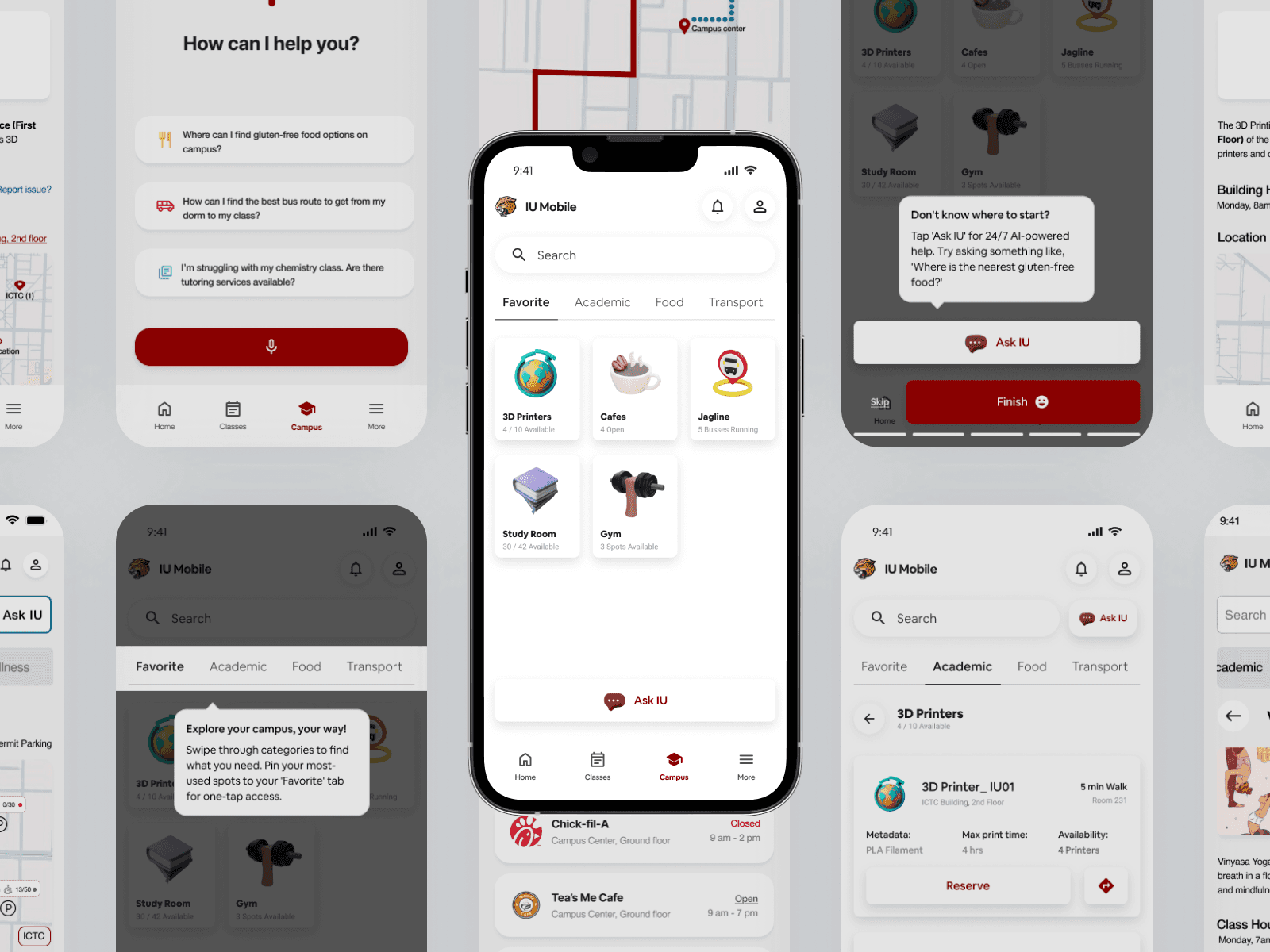
Working closely with the Chancellor’s Office and a cross-functional team of four, we brainstormed and developed a solution to solve a massive usability failure: students were abandoning the official university app because it lacked real-time, everyday utility. We built an integrated dashboard within the IU Mobile App that gives students personalized access to resources, live availability, and an "Ask IU" conversational assistant.
The result: a 57% reduction in the time spent searching for resources, 90% user satisfaction, and successful implementation approval from University IT Services (UITS).
✨
HIGHLIGHTS
Transforming how students navigate campus life with
real-time updates and an intuitive UI
✨
CONTEXT
When campus navigation turns into a daily battle
A modern struggle between fragmentation
and discovery
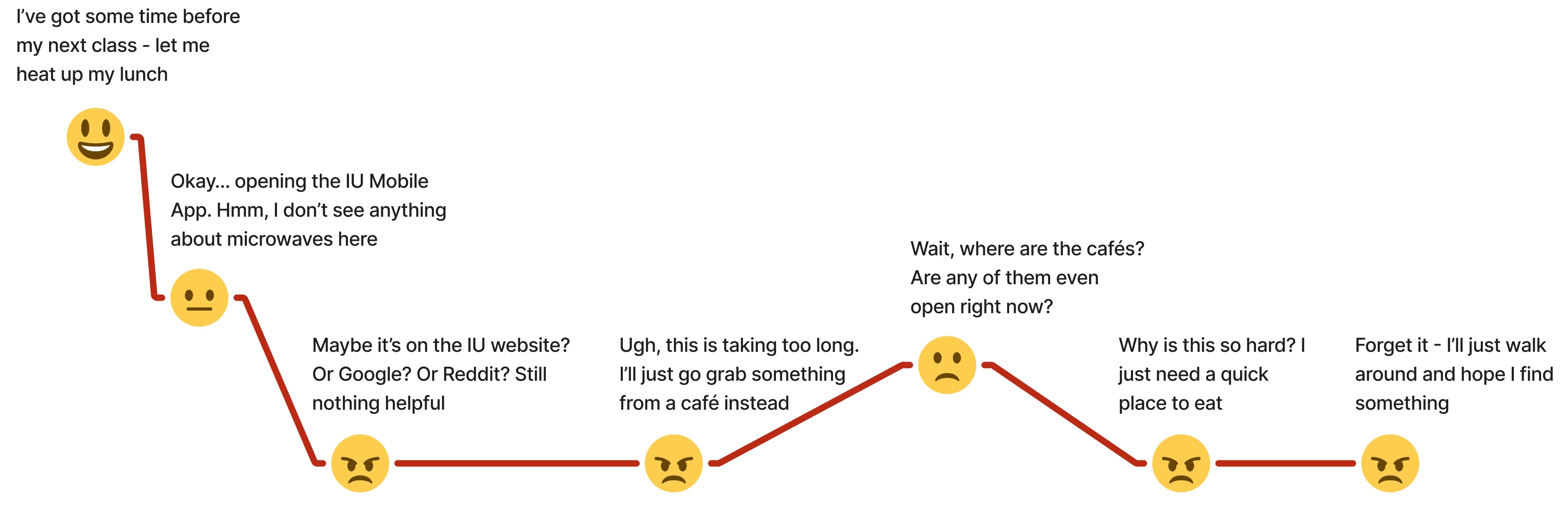
Modern students are stepping onto massive campuses with dozens of resources from study rooms to 3D printers and microwaves but finding them feels like an impossible task. Traditional campus apps focus heavily on class schedules and static maps, leaving out the daily life essentials that actually make a campus feel like home.
This often backfires. Instead of feeling supported, students face an adversarial dynamic with their environment, leading to high anxiety, reliance on word-of-mouth, and a disjointed campus experience. What should be a seamless journey turns into daily friction.
✨
PROBLEM
"Where is the microwave in this building?"
A simple question exposing a campus-wide usability failure
What started as a simple observation from the Chancellor about students struggling to find microwaves exposed a massive flaw in how information was delivered.
Existing tools weren’t built for real student needs, leading to:
Fragmented Systems:
70% of students had to switch between 3 to 5 different platforms just to find a single resource.
App Abandonment:
50% of students abandoned the official IU mobile app within their first week because it felt overwhelming and unhelpful.
Broken Trust:
92% of students relied entirely on word-of-mouth because official digital tools lacked real-time context.
Integration over Invention
Instead of creating yet another app for students to juggle, we realized that integrating our solution directly into the existing IU Mobile App ecosystem would ensure scalability, reduce friction, and guarantee long-term adoption.
✨
THE PROBLEM STATEMENT
How might we help students quickly and easily find and access campus resources when they need them most?
✨
WHY RESEARCH?
Before solutions, we asked better questions
Research methods at a glance
We needed to validate the need for a centralized dashboard, understand how students planned their days, and outline a Minimum Viable Product (MVP) that students would actually adopt.
We used a mixed-methods approach to turn assumptions into evidence :-
Secondary Research:
Reviewed 10+ academic papers on student retention, sense of belonging, and digital campus navigation.
Competitive Analysis:
Evaluated 4 university platforms (One.IU, Michigan App, Purdue Mobile, UIC Ride) using a feature matrix.
Quantitative Survey & Interviews:
Gathered 20+ survey responses and conducted 6 in-depth semi-structured interviews with both new and existing students.




Key insights from competitive analysis
Delayed Decisions:
Most tools rely on static maps without live availability.
Thin Decision Context:
Students typically only see building names. Specifics like microwave locations, 3D printers, or accessibility features are missing.
Binary Controls:
Tools either focus entirely on academics or transportation, failing to centralize the holistic student experience.
✨
CRITICAL DISCOVERY
Most students aren’t aware of what's right in front of them
Understanding where students struggled
Our research revealed that the root of the problem wasn't a lack of resources, but a systemic failure in how information was delivered.
Blind Decisions:
Walking across campus with no context on open hours or availability.
Control Workarounds:
Using 3 different apps (Google Maps, Canvas, Jag Line) to complete one campus journey.
Anxiety with Navigation:
Unclear signage and confusing building layouts created stress, particularly for new and international students.
✨
RESEARCH TAKEAWAY
These insights shaped our 3 core design principles:
Centralized Campus Resource Hub
Enhanced Navigation
Real-Time Resource
Tracking
✨
DESIGN & ITERATION
Rapid Prototyping for Validation
Prioritization of Key Features
Working within a 35-week constraint, I prioritized sketching and low-fidelity mockups to quickly validate concepts with stakeholders and users.
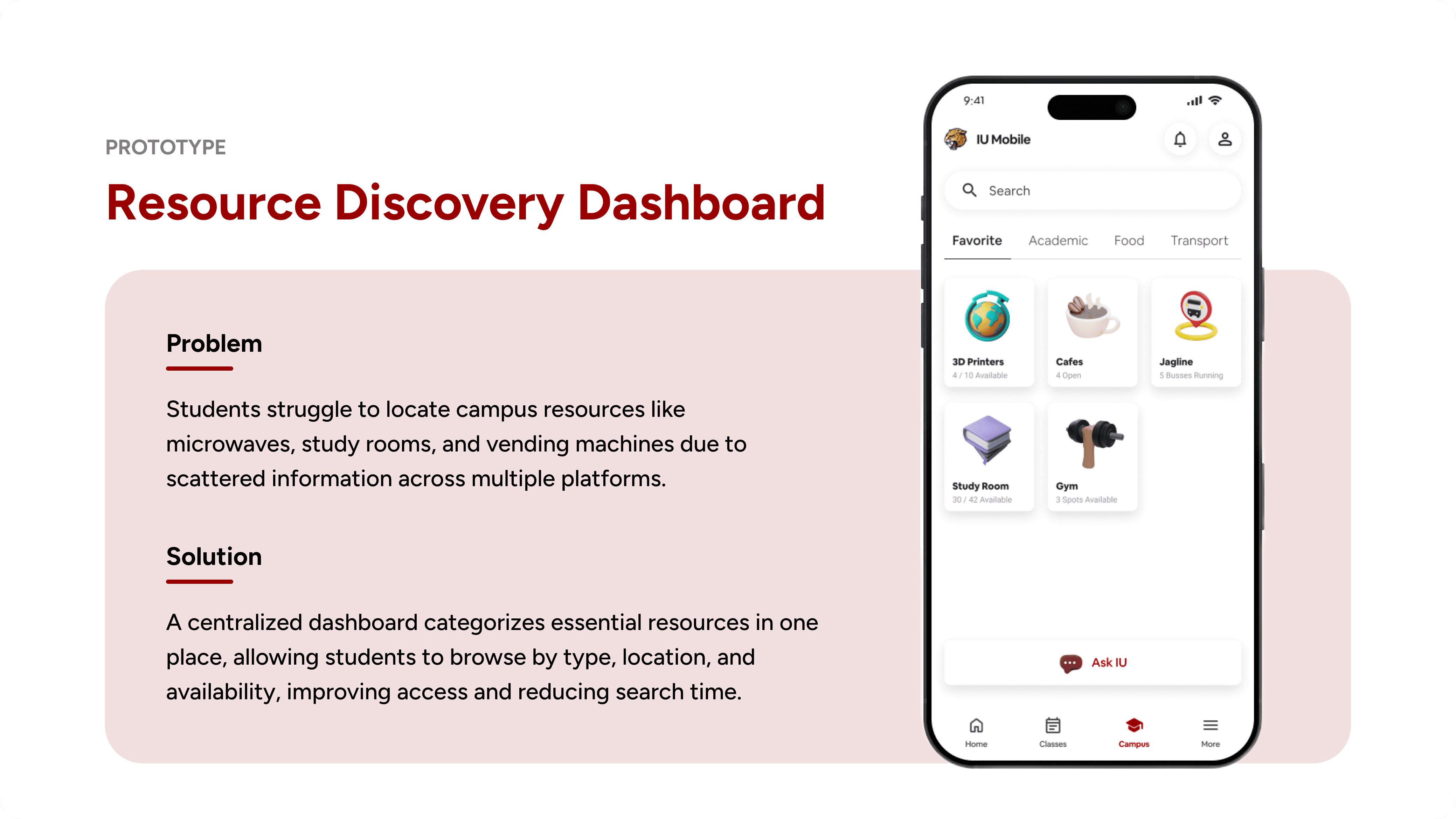
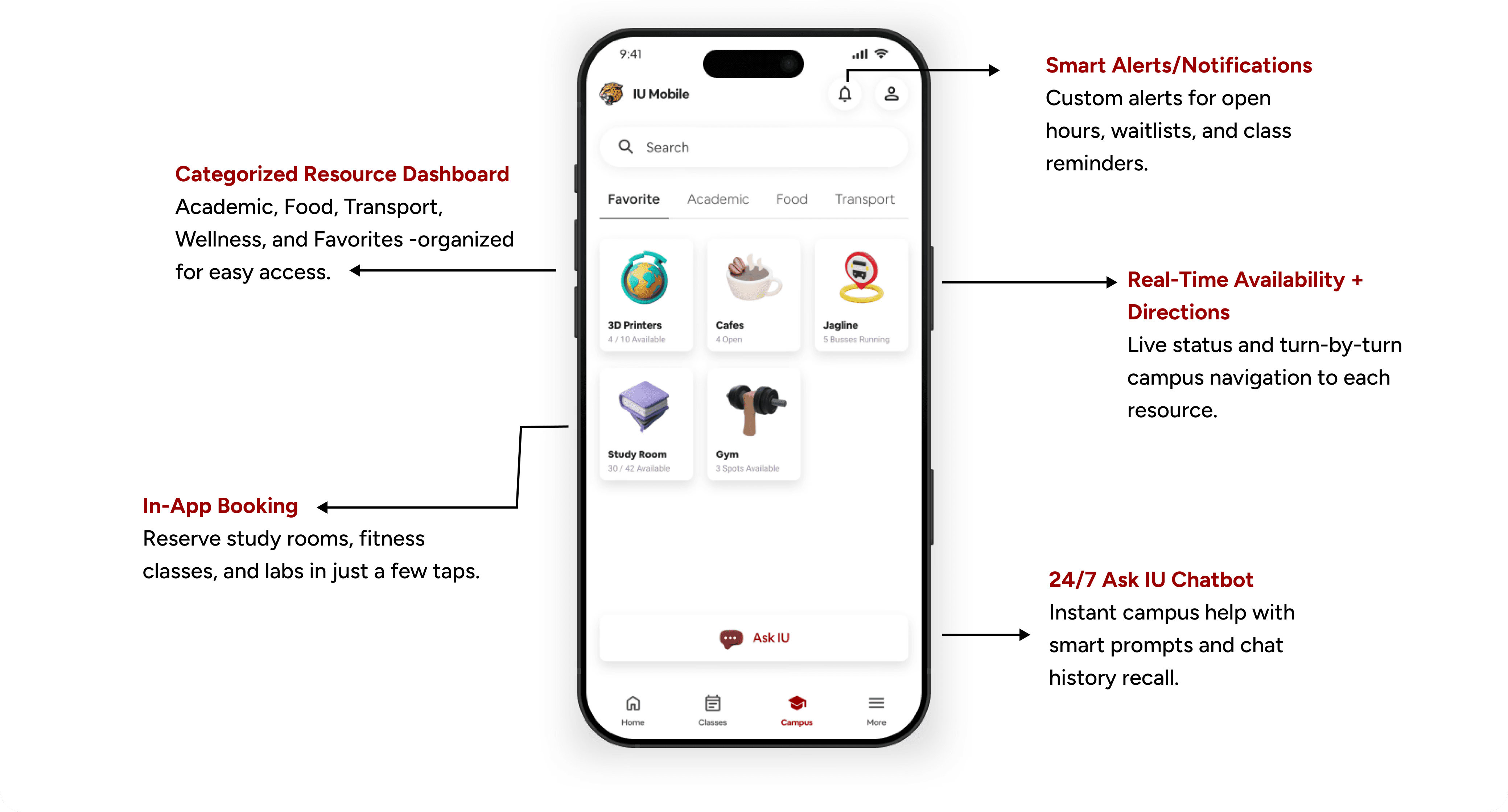
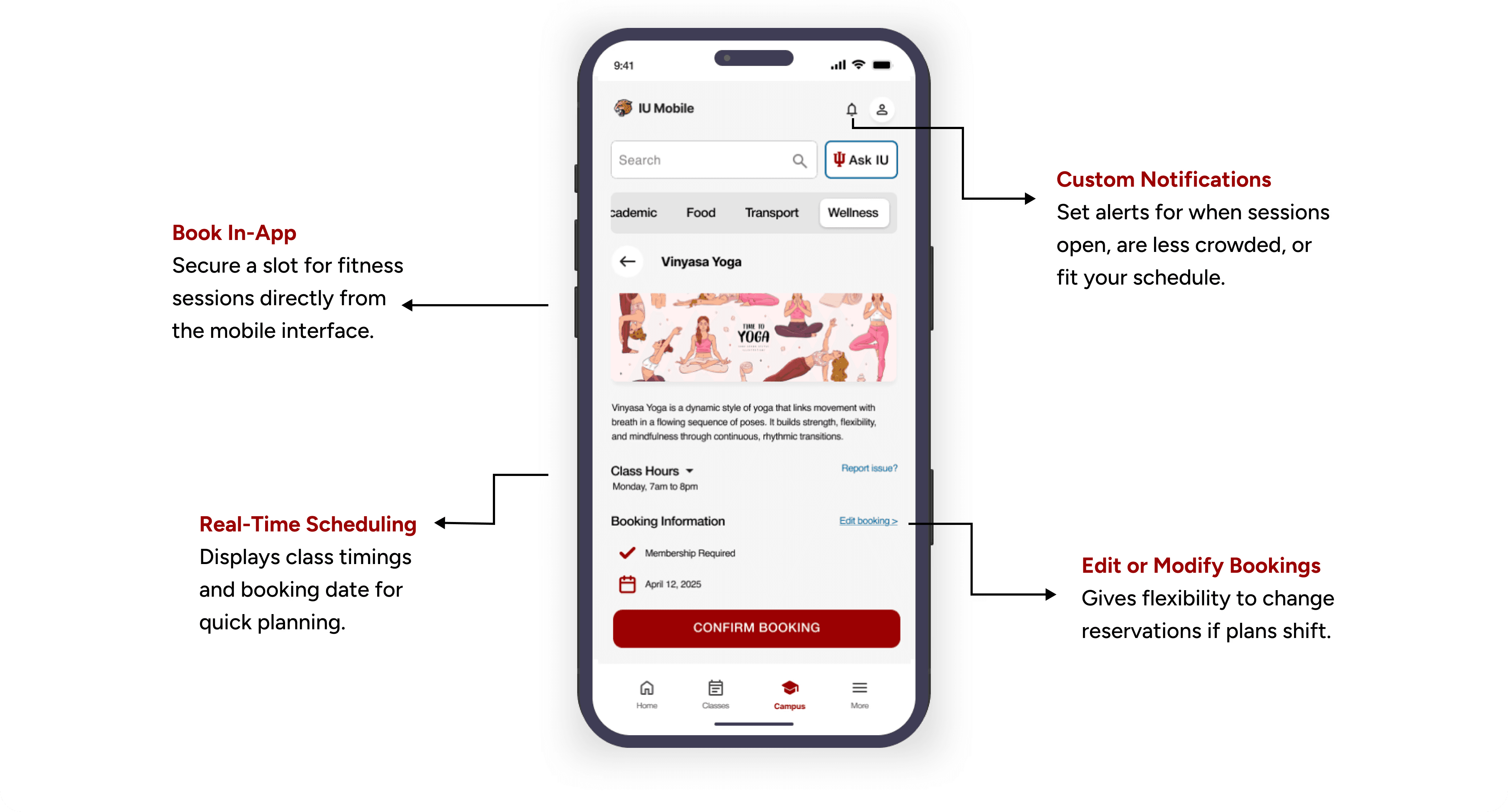
Categorized Dashboard:
Grouped resources intuitively into Favorites, Academic, Food, Transport, and Wellness to reduce cognitive load.
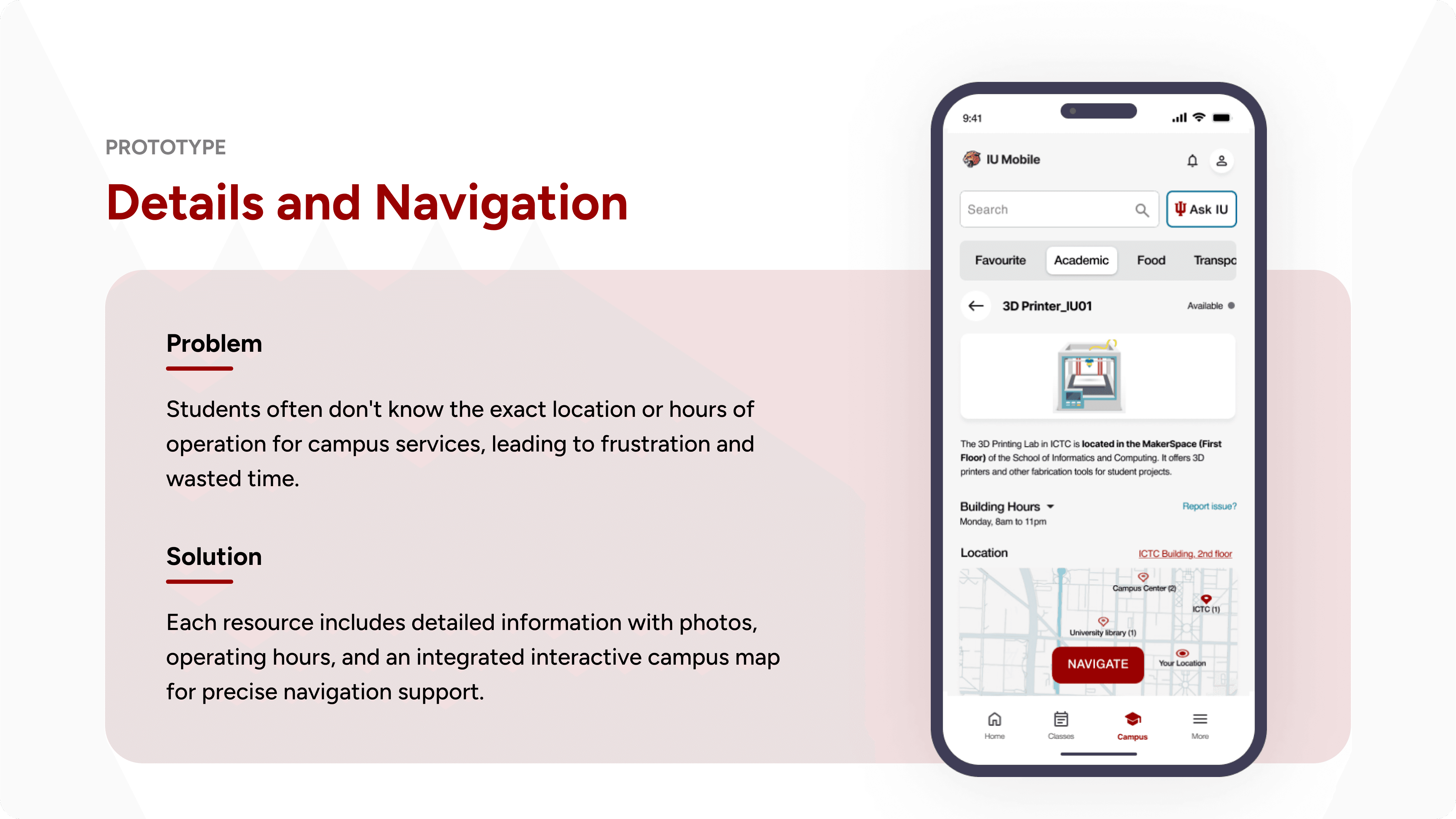
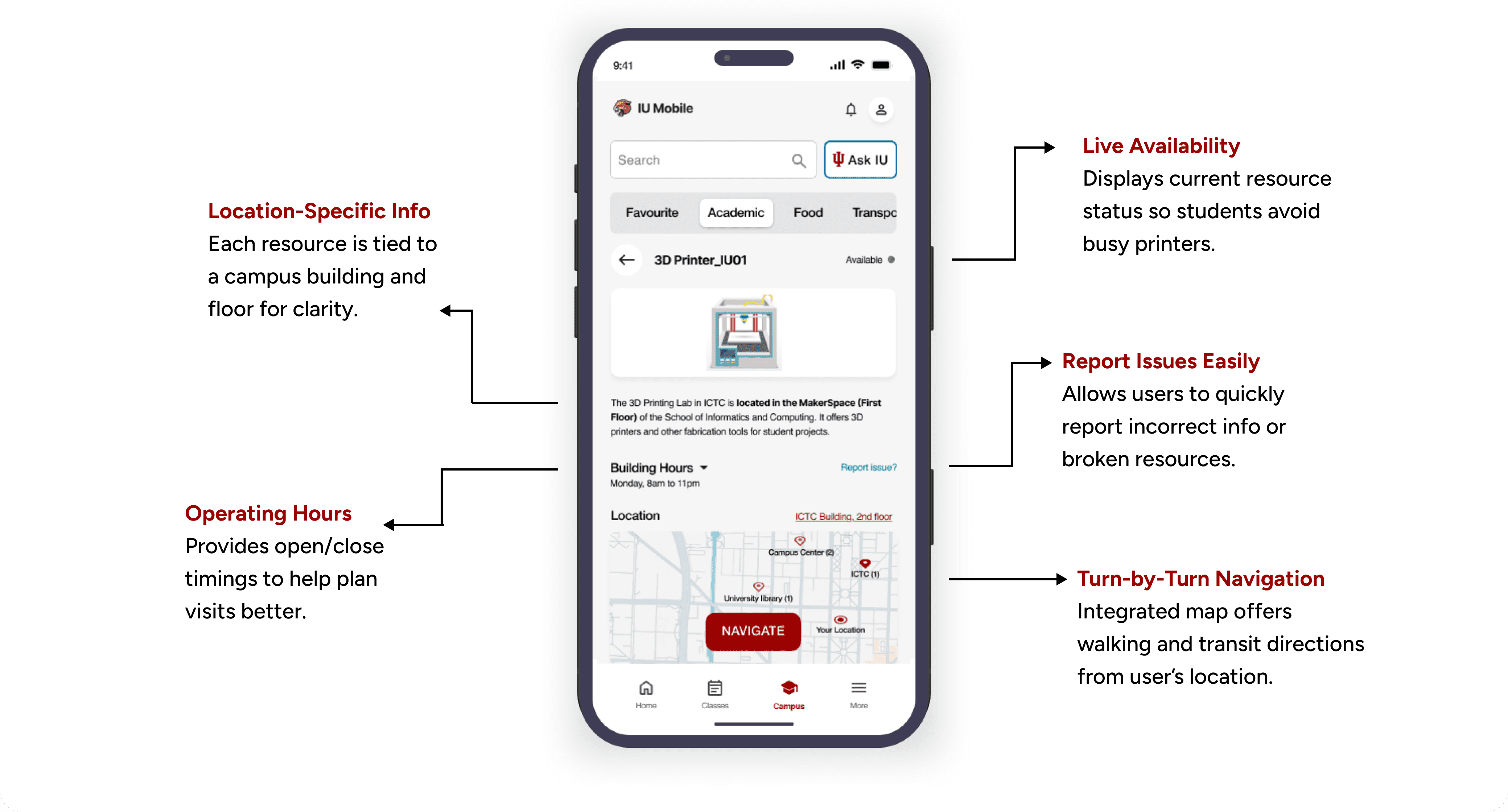
Interactive Map Integration:
Added dynamic maps that highlight selected resources and provide real-time navigation.
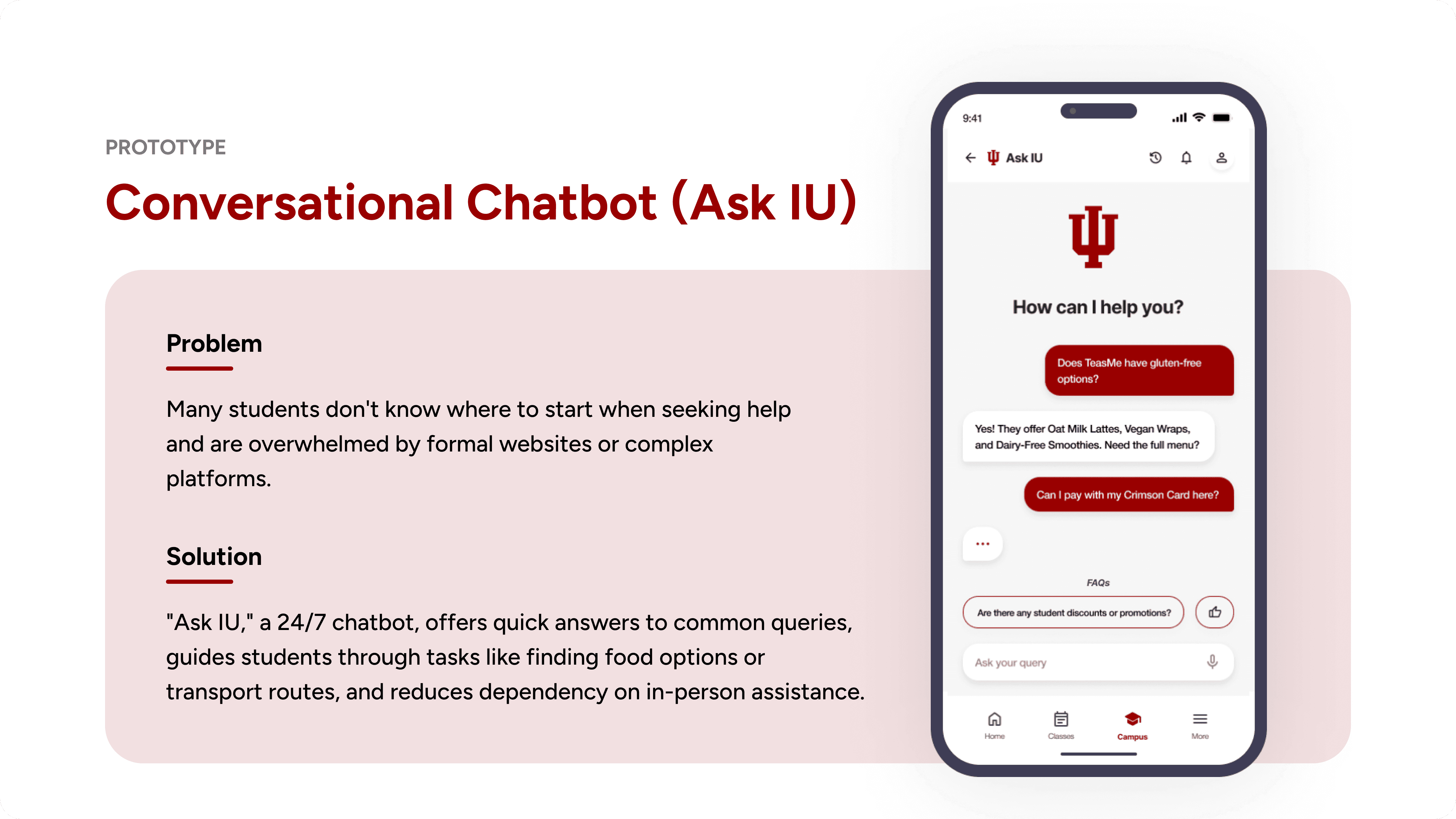
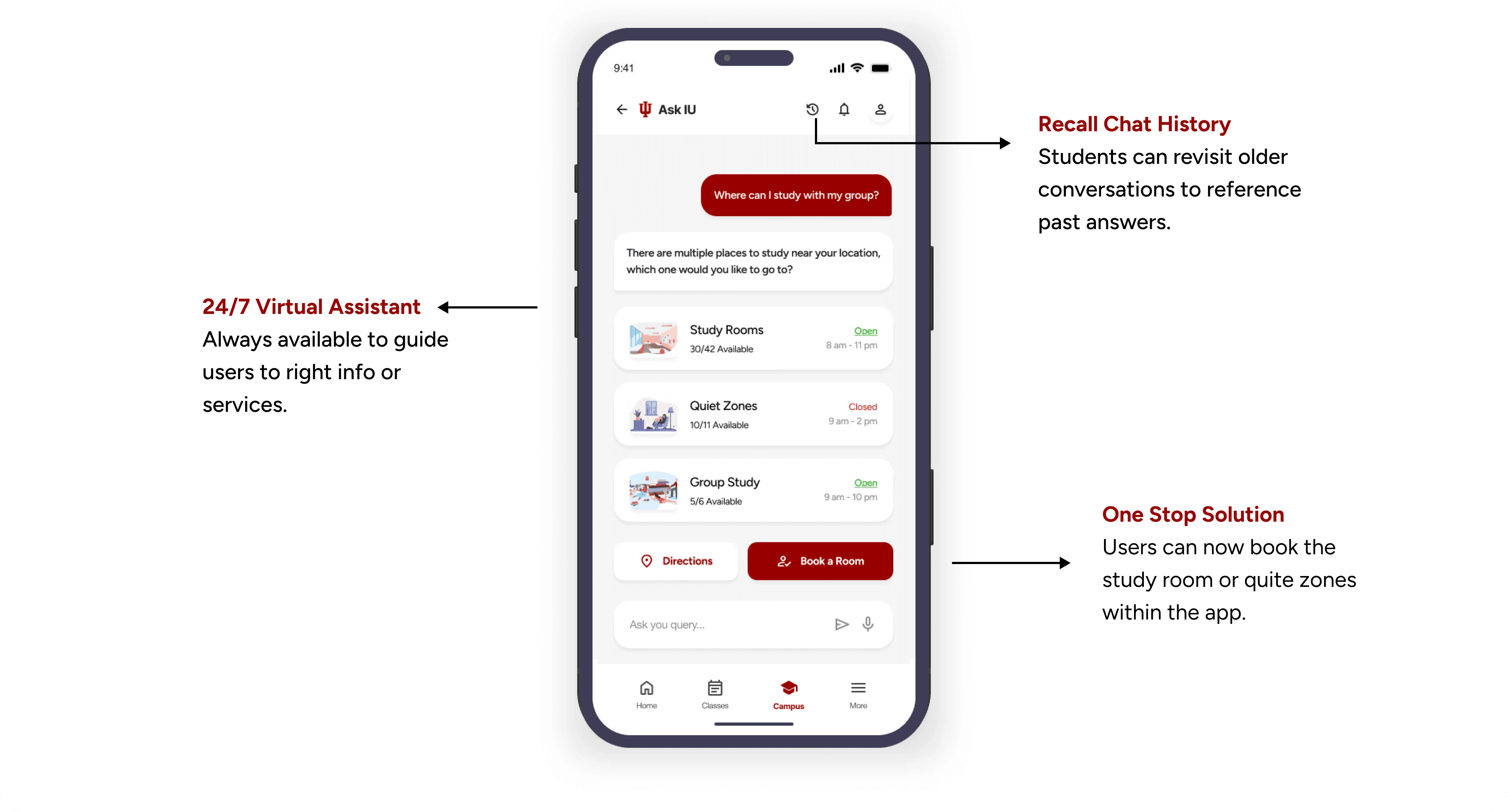
"Ask IU" Chatbot:
Designed a 24/7 AI-powered assistant with categorical prompts to answer specific resource questions instantly.
✨
DESIGN TECHNICAL ROADBLOCK (UNIVERSITY IT SERVICES LIMITATIONS)
I designed the flow to show live statuses for everything, but later learned our API couldn't support static resources
Learning from technical constraints
During early prototyping, I designed the dashboard to show real-time "Available/In Use" indicators for every single item on campus.
However, collaborating with University IT Services (UITS) revealed technical limitations.
The Pivot on Real-Time Tracking:
UITS confirmed real-time updates were viable for dynamic resources (labs, printers), but impossible for static resources like microwaves. We pivoted to displaying "Building Hours" for static items instead.
The Pivot on AI:
Implementing a full generative AI model for the chatbot was cost-prohibitive. We adapted by adopting a highly effective, dataset-driven FAQ response model.
Key Takeaway
This experience reinforced the critical importance of validating technical boundaries with developers before finalizing design flows.
✨
FROM FIRST DRAFT TO FINAL DESIGN
After addressing technical constraints with UITS, we evolved the interface into a polished, validated solution
DASHBOARD SCREEN
ACADEMIC RESOURCE DETAILS SCREEN
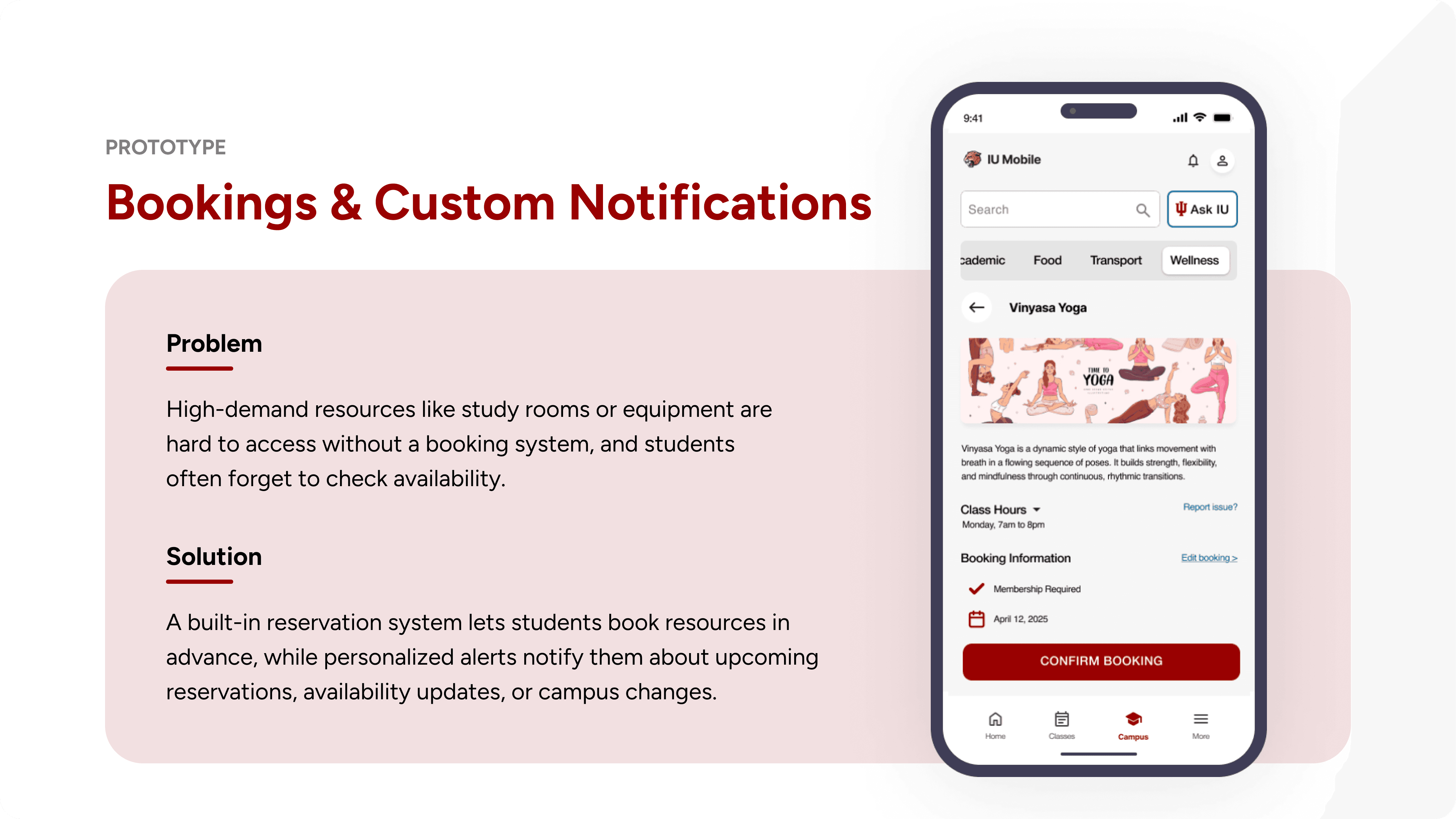
IN APP BOOKING SCREEN
ASK IU 24/7 CHATBOT SCREEN
✨
USABILITY TESTING
Testing the Experience Before Perfecting It
Pilot first, data next, insights always
We conducted rigorous testing using Think-Aloud Protocols, Heuristic Evaluations, and Cognitive Walkthroughs.
Quantitative Metrics:
Reduced resource-finding time by 57%, and 90% of users found the app intuitive and helpful.
Qualitative Feedback:
Users loved the chatbot's friendly tone and pre-set prompts, but struggled with some navigation loops.
✨
LEARNINGS FROM USABILITY TESTING
Testing revealed friction points that we immediately
resolved in our final iterations
Observe first, adapt fast and refine
Confusing Chatbot Labels
Before: The label "AI for IU" was confusing, and the screen was cluttered.
After: Renamed to "Ask IU," removed unnecessary icons to prioritize text input, and added a distinct "Chat History" icon.
Navigation Constraints
Before: Users got stuck in photo and menu views with no clear exit points.
After: Added universal "Back to List" buttons and standardized navigation headers.
Not Enough Data Points for Booking
Before: Users had to manually search for study rooms that fit their needs.
After: Added dropdown filters for date, duration, and seat count, along with visual indicators for room features (outlets, projectors).
USABILITY TESTING TURNED GUESSES INTO REAL INSIGHTS
63% of participants discovered campus resources they didn’t even know existed, proving the design
successfully surfaced hidden value.
✨
LEARNINGS
Reflecting, Learning, and Growing Through Every Project
Learning from technical constraints
Small Insights Drive Big Change:
A seemingly simple question about finding a microwave revealed a fundamental, systemic flaw in how students access the campus.
Stakeholder Alignment is as Important as Empathy:
Collaborating with UITS early on ensured our designs were practical and technically feasible to build.
Designing for Scalability Matters:
By integrating our solution into the existing IU Mobile ecosystem rather than building a standalone app, we ensured long-term adoption and technical viability.
Back to Top
✨
Featured Projects
Where impactful storytelling meets immaculate UX

Hi
Your next UX designer is one email away 😇
I’m currently open for full time roles and collaborations where I can bring user-centered magic to the table ✨
Made with 💖 and 🍵 by Nandini © 2026
Indiana University Access IU - 2025
Centralizing the Student Campus Experience
Access IU’s Centralized Dashboard Reduced Average Resource-Finding Time by 63%
My Role
UX Designer
UX Research, Interaction Design, Strategic Alignment, Conversational UI (CUI), Usability Testing
Team
Me (UX Designer)
2 Visual Designers
1 UX Researcher
IU Chancellor’s Office
University Board Members
University IT Services Team
Timeline
35 Weeks
Overview
I helped lead the end-to-end design of a centralized digital hub that reimagines how students navigate campus life and access everyday resources at Indiana University Indianapolis.
Working closely with the Chancellor’s Office and a cross-functional team of four, we brainstormed and developed a solution to solve a massive usability failure: students were abandoning the official university app because it lacked real-time, everyday utility. We built an integrated dashboard within the IU Mobile App that gives students personalized access to resources, live availability, and an "Ask IU" conversational assistant.
The result: a 57% reduction in the time spent searching for resources, 90% user satisfaction, and successful implementation approval from University IT Services (UITS).
✨
HIGHLIGHTS
Transforming how students navigate campus life with
real-time updates and an intuitive UI
✨
CONTEXT
When campus navigation turns into a daily battle
A modern struggle between fragmentation
and discovery
Modern students are stepping onto massive campuses with dozens of resources from study rooms to 3D printers and microwaves but finding them feels like an impossible task. Traditional campus apps focus heavily on class schedules and static maps, leaving out the daily life essentials that actually make a campus feel like home.
This often backfires. Instead of feeling supported, students face an adversarial dynamic with their environment, leading to high anxiety, reliance on word-of-mouth, and a disjointed campus experience. What should be a seamless journey turns into daily friction.
✨
PROBLEM
"Where is the microwave in this building?"
A simple question exposing a campus-wide usability failure
What started as a simple observation from the Chancellor about students struggling to find microwaves exposed a massive flaw in how information was delivered.
Existing tools weren’t built for real student needs, leading to:
Fragmented Systems:
70% of students had to switch between 3 to 5 different platforms just to find a single resource.
App Abandonment:
50% of students abandoned the official IU mobile app within their first week because it felt overwhelming and unhelpful.
Broken Trust:
92% of students relied entirely on word-of-mouth because official digital tools lacked real-time context.
Integration over Invention
Instead of creating yet another app for students to juggle, we realized that integrating our solution directly into the existing IU Mobile App ecosystem would ensure scalability, reduce friction, and guarantee long-term adoption.
✨
THE PROBLEM STATEMENT
How might we help students quickly and easily find and access campus resources when they need them most?
✨
WHY RESEARCH?
Before solutions, we asked better questions
Research methods at a glance
We needed to validate the need for a centralized dashboard, understand how students planned their days, and outline a Minimum Viable Product (MVP) that students would actually adopt.
We used a mixed-methods approach to turn assumptions into evidence :-
Secondary Research:
Reviewed 10+ academic papers on student retention, sense of belonging, and digital campus navigation.
Competitive Analysis:
Evaluated 4 university platforms (One.IU, Michigan App, Purdue Mobile, UIC Ride) using a feature matrix.
Quantitative Survey & Interviews:
Gathered 20+ survey responses and conducted 6 in-depth semi-structured interviews with both new and existing students.
Key insights from competitive analysis
Delayed Decisions:
Most tools rely on static maps without live availability.
Thin Decision Context:
Students typically only see building names. Specifics like microwave locations, 3D printers, or accessibility features are missing.
Binary Controls:
Tools either focus entirely on academics or transportation, failing to centralize the holistic student experience.
✨
CRITICAL DISCOVERY
Most students aren’t aware of what's right in front of them
Understanding where students struggled
Our research revealed that the root of the problem wasn't a lack of resources, but a systemic failure in how information was delivered.
Blind Decisions:
Walking across campus with no context on open hours or availability.
Control Workarounds:
Using 3 different apps (Google Maps, Canvas, Jag Line) to complete one campus journey.
Anxiety with Navigation:
Unclear signage and confusing building layouts created stress, particularly for new and international students.
✨
RESEARCH TAKEAWAY
These insights shaped our 3 core design principles:
Centralized Campus Resource Hub
Enhanced Navigation
Real-Time Resource
Tracking
✨
DESIGN & ITERATION
Rapid Prototyping for Validation
Prioritization of Key Features
Working within a 35-week constraint, I prioritized sketching and low-fidelity mockups to quickly validate concepts with stakeholders and users.
Categorized Dashboard:
Grouped resources intuitively into Favorites, Academic, Food, Transport, and Wellness to reduce cognitive load.
Interactive Map Integration:
Added dynamic maps that highlight selected resources and provide real-time navigation.
"Ask IU" Chatbot:
Designed a 24/7 AI-powered assistant with categorical prompts to answer specific resource questions instantly.
✨
DESIGN TECHNICAL ROADBLOCK (UNIVERSITY IT SERVICES LIMITATIONS)
I designed the flow to show live statuses for everything, but later learned our API couldn't support static resources
Learning from technical constraints
During early prototyping, I designed the dashboard to show real-time "Available/In Use" indicators for every single item on campus.
However, collaborating with University IT Services (UITS) revealed technical limitations.
The Pivot on Real-Time Tracking:
UITS confirmed real-time updates were viable for dynamic resources (labs, printers), but impossible for static resources like microwaves. We pivoted to displaying "Building Hours" for static items instead.
The Pivot on AI:
Implementing a full generative AI model for the chatbot was cost-prohibitive. We adapted by adopting a highly effective, dataset-driven FAQ response model.
Key Takeaway
This experience reinforced the critical importance of validating technical boundaries with developers before finalizing design flows.
✨
FROM FIRST DRAFT TO FINAL DESIGN
After addressing technical constraints with UITS, we evolved the interface into a polished, validated solution
DASHBOARD SCREEN
ACADEMIC RESOURCE DETAILS SCREEN
IN APP BOOKING SCREEN
ASK IU 24/7 CHATBOT SCREEN
✨
USABILITY TESTING
Testing the Experience Before Perfecting It
Pilot first, data next, insights always
We conducted rigorous testing using Think-Aloud Protocols, Heuristic Evaluations, and Cognitive Walkthroughs.
Quantitative Metrics:
Reduced resource-finding time by 57%, and 90% of users found the app intuitive and helpful.
Qualitative Feedback:
Users loved the chatbot's friendly tone and pre-set prompts, but struggled with some navigation loops.
✨
LEARNINGS FROM USABILITY TESTING
Testing revealed friction points that we immediately
resolved in our final iterations
Observe first, adapt fast and refine
Confusing Chatbot Labels
Before: The label "AI for IU" was confusing, and the screen was cluttered.
After: Renamed to "Ask IU," removed unnecessary icons to prioritize text input, and added a distinct "Chat History" icon.
Navigation Constraints
Before: Users got stuck in photo and menu views with no clear exit points.
After: Added universal "Back to List" buttons and standardized navigation headers.
Not Enough Data Points for Booking
Before: Users had to manually search for study rooms that fit their needs.
After: Added dropdown filters for date, duration, and seat count, along with visual indicators for room features (outlets, projectors).
USABILITY TESTING TURNED GUESSES INTO REAL INSIGHTS
63% of participants discovered campus resources they didn’t even know existed, proving the design
successfully surfaced hidden value.
✨
LEARNINGS
Reflecting, Learning, and Growing Through Every Project
Learning from technical constraints
Small Insights Drive Big Change:
A seemingly simple question about finding a microwave revealed a fundamental, systemic flaw in how students access the campus.
Stakeholder Alignment is as Important as Empathy:
Collaborating with UITS early on ensured our designs were practical and technically feasible to build.
Designing for Scalability Matters:
By integrating our solution into the existing IU Mobile ecosystem rather than building a standalone app, we ensured long-term adoption and technical viability.
Back to Top
✨
Featured Projects
Where impactful storytelling meets immaculate UX
Hi
Your next UX designer is one email away 😇
I’m currently open for full time roles and collaborations where I can bring user-centered magic to the table ✨
Made with 💖 and 🍵 by Nandini © 2026